
For most small businesses, Square Register (2nd Generation) is the strongest all-around starting point, while Clover Station Duo suits shops that want a customer-facing display and Square Terminal fits mobile checkout. The right point of sale system depends on whether you need a complete counter setup, portable payments, or a lower-cost way to use a tablet you already own. Compatibility, payment processing, included hardware, and the work of maintaining separate devices can matter as much as the touchscreen itself. I compare 12 options by their fit for small-business workflows, hardware, and setup tradeoffs. Read on for the full breakdown and a guide to choosing by business type.
Key Takeaways
- Square Register leads for a ready-made counter setup, while Square Terminal and Square Handheld trade a fixed register layout for mobility.
- Clover Station Duo stands apart with a customer-facing screen, a useful distinction for businesses where customers review orders or complete checkout themselves.
- The Datio iPad and Fire tablet bundles can make use of familiar tablet hardware, but buyers should check device compatibility and what the bundle includes before committing.
- Volcora and SmartPOS 129 offer larger, more complete terminal-style setups; their broader hardware footprint may be more than a small or mobile business needs.
- Compact options such as SumUp POS Lite and the H10 Android terminal prioritize a smaller footprint, so compare their included peripherals and operating requirements with your daily checkout needs.
| Square Register (2nd Generation) Point of Sale System |  | Best Overall Countertop System | Generation: 2nd | Display: Dual responsive touchscreens | Software: Built-in POS software | VIEW LATEST PRICE | See Our Full Breakdown |
| Volcora POS Terminal with Windows 11 Professional, 15.6-Inch Touchscreen |  | Best for Windows-Based POS Setups | Operating system: Windows 11 Professional | Processor: Intel Core i5 | Memory: 4 GB | VIEW LATEST PRICE | See Our Full Breakdown |
| SumUp POS Lite Compact 13-Inch Touchscreen Point of Sale System |  | Best for Flexible, Low-Commitment Setup | Screen size: 13 inches | Stand material: Die-cast aluminium | Software: Pre-installed POS software with automated updates | VIEW LATEST PRICE | See Our Full Breakdown |
| Datio POS System with Cash Drawer and Receipt Printer for 9.7–10.2-Inch iPads |  | Best for iPad Counter Bundles | Color: White | Compatible iPad sizes: 9.7–10.2 inches | Included components: Register base, thermal receipt printer, locking cash drawer, power and connection cables | VIEW LATEST PRICE | See Our Full Breakdown |
| Square Handheld Portable POS Payment Terminal |  | Best for Mobile Checkout | Functions: Payment acceptance, tableside ordering, barcode scanning | Payment methods: Major credit and debit cards | Connectivity: Offline payments supported | VIEW LATEST PRICE | See Our Full Breakdown |
| H10 Android 14 POS Terminal, 58mm Printer, Barcode Scanner, NFC |  | Best for Mobile Retail | Operating system: Android 14 | Processor: Octa-core, 2.0 GHz | Memory and storage: 3 GB RAM; 32 GB ROM | VIEW LATEST PRICE | See Our Full Breakdown |
| Clover Station Duo POS System |  | Best for Customer-Facing Checkout | Merchant display: 14-inch HD | Customer display: 8-inch touchscreen | Included hardware: Printer and cash drawer | VIEW LATEST PRICE | See Our Full Breakdown |
| Square Terminal Mobile Point-of-Sale and Credit Card Machine |  | Best for Simple Mobile Payments | Payment methods: Major credit and debit cards | Chip card processing: About 2 seconds | Battery: Built-in; designed to last all day | VIEW LATEST PRICE | See Our Full Breakdown |
| Datio POS Base Station and Cash Register for iPad |  | Best for Flexible Payment Setups | Compatible software: Datio POS | Software subscription: Monthly; includes software, phone, text, and email support, and online reports | Payment options: Worldpay processing with approval, another processor and terminal, or cash only | VIEW LATEST PRICE | See Our Full Breakdown |
| SmartPOS 129 All-in-One POS System with Dual Touchscreens |  | Best for Processor Choice | Cashier touchscreen: 15 inches | Customer-facing display: 15 inches | Included hardware: Cash drawer, handheld scanner, thermal printer | VIEW LATEST PRICE | See Our Full Breakdown |
| Touchscreen POS Cash Register with Built-In Thermal Printer | 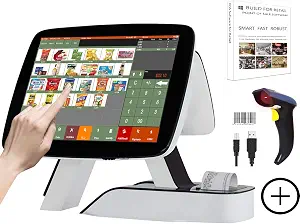 | Best for All-in-One Retail Checkout | Main display: 15 inches, 1024 × 768 | Customer display: 11.6 inches | Processor: Intel Core i5 | VIEW LATEST PRICE | See Our Full Breakdown |
| Datio POS System for 10-Inch Amazon Fire Tablet with Receipt Printer, Cash Drawer, and Stand |  | Best for Fire Tablet-Based Counters | Included components: Register base, thermal receipt printer, cash drawer, and stand | Tablet compatibility: 10-inch Amazon Fire Tablet | Tablet included: No | VIEW LATEST PRICE | See Our Full Breakdown |
More Details on Our Top Picks
Square Register (2nd Generation) Point of Sale System
Square Register (2nd Generation) is the strongest fit here for a small business that wants a dedicated checkout station with its POS software built in. Its dual touchscreens give staff and customers separate views during checkout, which can make a busy counter easier to manage. Compared with the Volcora POS Terminal, it arrives with POS software rather than leaving software selection and setup to the buyer. The IP54-rated design also offers some protection from everyday dust and splashes around a working counter.
The tradeoff is that the listing gives no connectivity details or payment-processing fee information, so I would confirm those before choosing it. It is less suited to merchants who need a portable device like the Square Handheld Portable POS Payment Terminal for tableside or roaming sales.
Pros:- Dual touchscreens support staff and customer checkout workflows
- Built-in POS software avoids sourcing a separate POS platform
- IP54-rated design resists everyday dust and spills
- Accepts major card payments
Cons:- Connectivity options are not specified in the provided product details
- Payment-processing fees are not specified
- Countertop design is less suited to mobile checkout than the Square Handheld Portable POS Payment Terminal
Best for: Small retailers and food-service counters that want a dedicated register, built-in POS software, and separate staff and customer screens
Not ideal for: Mobile sellers who need a pocketable checkout device, or businesses that need confirmed connectivity and processing-fee details before purchase
- Generation:2nd
- Display:Dual responsive touchscreens
- Software:Built-in POS software
- Payment acceptance:Major cards
- Form factor:Countertop point of sale system
Our verdict“Choose Square Register if you want an all-in-one countertop checkout with built-in software and dual screens.”
Volcora POS Terminal with Windows 11 Professional, 15.6-Inch Touchscreen
Volcora POS Terminal suits a small business that already has a Windows POS application in mind and needs a large, fixed touchscreen terminal. Its 15.6-inch display and multiple ports give it more room for peripheral connections than the compact SumUp POS Lite. Ethernet, serial, USB, HDMI, and audio inputs can help a shop connect compatible equipment at the counter.
The main catch is that this is hardware only: no POS software is specified, so setup depends on choosing compatible software and confirming it works with the terminal. Its 4 GB of memory is also modest for a Windows 11 machine, making it a less flexible choice than a purpose-built system such as Square Register for buyers who want software included. The listed limited lifetime warranty and US-based support may appeal to owners who value ongoing hardware assistance.
Pros:- 15.6-inch capacitive touchscreen provides a large checkout workspace
- Ports include Ethernet, four USB, two serial, HDMI, and audio input
- Metal base provides a sturdy countertop setup
- Limited lifetime warranty and US-based customer support are listed
Cons:- POS software is not specified or included in the provided details
- 4 GB of memory may limit flexibility for demanding software
- The listing does not describe payment processing or card acceptance
Best for: Small retailers with a compatible Windows POS application and peripherals that use Ethernet, USB, or serial connections
Not ideal for: First-time operators who want POS software included, or businesses whose software needs may outgrow a terminal with 4 GB of memory
- Operating system:Windows 11 Professional
- Processor:Intel Core i5
- Memory:4 GB
- Storage:128 GB hard drive
- Screen:15.6-inch capacitive LCD touchscreen
- Display resolution:1366 × 768
- Ports:2 serial, 4 USB, HDMI, audio input, DC 12V power input, Ethernet
- Warranty:Limited lifetime warranty
Our verdict“Pick Volcora if your business already has Windows POS software and needs a large, well-connected counter terminal.”
SumUp POS Lite Compact 13-Inch Touchscreen Point of Sale System
SumUp POS Lite is a practical match for a small business that wants a compact touchscreen system and prefers to avoid a fixed monthly software fee or binding contract. Its pre-installed POS software and automated updates make it more ready to use than the Volcora POS Terminal, which is hardware only in the provided details. The 13-inch screen and die-cast aluminium stand also take a smaller footprint than Volcora’s 15.6-inch terminal.
That flexibility comes with a per-payment processing charge: the listing states 2.6% + 10 per card reader payment. I would check the currency and applicable terms before buying, since they are not specified here. Compared with the Datio iPad POS System, SumUp includes its own screen and software, while Datio requires a compatible iPad and app subscription. SumUp is less suitable if you need a listed cash drawer or receipt printer.
Pros:- Pre-installed POS software with automated updates
- No fixed monthly fees are listed
- No binding contract is listed
- 13-inch touchscreen on a die-cast aluminium stand
Cons:- Card reader payments incur a listed fee of 2.6% + 10, with currency and terms unspecified
- Cash drawer and receipt printer are not listed as included
- Its 13-inch display is smaller than the Volcora terminal’s 15.6-inch screen
Best for: Independent shops and small service businesses seeking a compact POS with included software and no fixed monthly fee or binding contract
Not ideal for: High-volume merchants focused on per-transaction costs, or counters that need an included cash drawer and receipt printer
- Screen size:13 inches
- Stand material:Die-cast aluminium
- Software:Pre-installed POS software with automated updates
- Fixed monthly fee:None listed
- Contract:No binding contract listed
- Payment processing fee:2.6% + 10 per card reader payment; currency not specified
Our verdict“Choose SumUp POS Lite if you want included POS software and a low-commitment setup, and are comfortable with per-payment fees.”
Datio POS System with Cash Drawer and Receipt Printer for 9.7–10.2-Inch iPads
Datio POS System with Cash Drawer and Receipt Printer is aimed at a small shop or restaurant that already uses a compatible iPad and wants the physical checkout pieces in one bundle. The included locking cash drawer and thermal receipt printer cover common counter needs; the printer needs no ink or toner. That makes this a more complete hardware package than the Volcora POS Terminal, which does not list a cash drawer or receipt printer.
The bundle depends on equipment and software you must arrange separately: the iPad is not included, and operation requires a Datio POS app subscription. That makes it a poorer fit for a new business starting without a tablet than SumUp POS Lite, which includes a screen and pre-installed software. The tabletop setup is intended for a fixed counter, so it does not match the mobility of the Square Handheld Portable POS Payment Terminal.
Pros:- Includes a locking cash drawer and thermal receipt printer
- Thermal printer does not require ink or toner
- Includes the register base and power and connection cables
- Designed for retail and restaurant checkout counters
Cons:- Compatible iPad must be purchased separately
- Requires a Datio POS app subscription
- Tabletop hardware is less suited to mobile or tableside checkout
Best for: Small retailers and restaurants that already own a compatible 9.7–10.2-inch iPad and want a cash drawer and receipt printer at the counter
Not ideal for: New businesses without a compatible iPad, or owners seeking to avoid a monthly POS app subscription
- Color:White
- Compatible iPad sizes:9.7–10.2 inches
- Included components:Register base, thermal receipt printer, locking cash drawer, power and connection cables
- Mounting type:Tabletop
- Form factor:Desk stand
- Software requirement:Datio POS app subscription
- Tablet included:No
Our verdict“Choose Datio if you already have a compatible iPad and want a counter bundle with a locking drawer and receipt printer.”
Square Handheld Portable POS Payment Terminal
Square Handheld Portable POS Payment Terminal is the clearest choice in this group for sellers who take payments away from a fixed counter. It combines card acceptance, tableside ordering, and barcode scanning in a slim device with a long-lasting battery. Offline payment support can help keep sales moving when connectivity drops, while splash and dust resistance suits busy service environments.
Its role is different from the Square Register (2nd Generation): Register gives a countertop business dual screens, while Handheld prioritizes movement and one-person checkout. That makes Handheld a better fit for table service, market stalls, or staff moving around a shop, but less suitable as the only terminal for a high-traffic fixed counter. The optional protective case is also a meaningful extra for a device carried throughout the day; confirm offline payment terms before relying on that feature.
Pros:- Supports major credit and debit cards
- Combines tableside ordering with barcode scanning
- Offline payments are supported
- Slim, lightweight design with a long-lasting battery
Cons:- Protective case for accidental drops is optional
- A handheld screen does not provide the dual-screen counter workflow of Square Register
- The provided details do not specify offline payment limits or processing terms
Best for: Cafes, restaurants, market sellers, and shop staff who need to take payments and scan items while moving around
Not ideal for: Businesses seeking a fixed dual-screen checkout station or an included protective case for frequent drop-prone use
- Functions:Payment acceptance, tableside ordering, barcode scanning
- Payment methods:Major credit and debit cards
- Connectivity:Offline payments supported
- Design:Slim, lightweight, pocketable
- Durability:Resistant to water splashes and dust
- Battery:Long-lasting
- Protective case:Optional
Our verdict“Pick Square Handheld if staff need to take card payments and scan items away from a fixed register.”
H10 Android 14 POS Terminal, 58mm Printer, Barcode Scanner, NFC
The H10 suits small retailers who need to scan items, take tap payments, and print receipts while moving around the shop or working off-site. Its built-in 1D/2D scanner and 58 mm thermal printer combine tasks that would otherwise mean carrying separate equipment. 4G LTE gives it a connection option beyond store Wi-Fi, while its 345 g weight supports one-handed use. Compared with the Square Terminal, the H10 adds a dedicated barcode scanner and Android hardware details, making it a stronger fit for scan-heavy inventory workflows. The tradeoff is that the supplied information does not identify a payment processor or POS software, so buyers should confirm compatibility before relying on it as a complete checkout system. Its 3000 mAh battery may also need careful planning through intensive shifts.
Pros:- Combines a dedicated 1D/2D barcode scanner and receipt printer in a handheld unit.
- NFC and 4G LTE support tap payments and connectivity away from store Wi-Fi, subject to compatible software and processing.
- Android 14, an octa-core 2.0 GHz processor, and 3 GB RAM provide the stated hardware platform for POS apps.
- At 345 g, it is designed for one-handed use.
Cons:- Battery capacity of 3000 mAh may limit runtime during intensive use.
- The product data does not specify compatible POS software or a payment processor, so buyers must confirm both.
- Its 58 mm printer format may not suit businesses that require wider receipts.
Best for: Small retailers, market sellers, and field teams that need handheld barcode scanning, NFC, and receipt printing in one device.
Not ideal for: Businesses seeking a clearly specified, ready-to-use POS and payment processing package, or teams that need long runtime through intensive shifts.
- Operating system:Android 14
- Processor:Octa-core, 2.0 GHz
- Memory and storage:3 GB RAM; 32 GB ROM
- Printer:58 mm thermal; 80 mm/s
- Barcode scanner:Hardware 1D/2D
- Connectivity:4G LTE, dual-band Wi-Fi, Bluetooth 5.3, NFC
- Battery and weight:3000 mAh lithium polymer; 345 g
- Warranty:1 year
Our verdict“Choose the H10 if mobile, scan-heavy selling is central to your workflow and you can confirm software and processor compatibility.”
Clover Station Duo POS System
The Clover Station Duo is built for a fixed checkout where the customer should be part of the transaction. Its 14-inch merchant display and 8-inch customer touchscreen give shoppers a place to confirm orders, tip, redeem rewards, and pay, while the included printer and cash drawer cover core counter needs. That makes it more interactive than the Datio POS Base Station, whose listing emphasizes a base station and software subscription rather than a second screen. Clover also supports expansion with compatible devices and accessories, which can help a small business add equipment as workflows grow. Its main constraint is the processing account requirement: the system must use Powering POS and is limited to the US, USVI, and Puerto Rico. Businesses that want processor choice should compare it with the SmartPOS 129, which lists integrations with over 50 processors.
Pros:- Separate merchant and customer screens support shared checkout steps.
- Includes a printer and cash drawer for a countertop setup.
- Customer touchscreen supports order confirmation, tipping, rewards redemption, and payment.
- Can expand with compatible countertop and handheld devices and accessories.
Cons:- Requires a Powering POS merchant processing account.
- Cannot be used with a different processor.
- Availability is limited to the US, USVI, and Puerto Rico.
Best for: US small businesses with a staffed counter that want customers to confirm orders, tips, rewards, and payment on a separate touchscreen.
Not ideal for: Businesses outside the US, USVI, or Puerto Rico, and owners who need to select a different payment processor.
- Merchant display:14-inch HD
- Customer display:8-inch touchscreen
- Included hardware:Printer and cash drawer
- Customer screen functions:Order confirmation, tipping, rewards redemption, and payment
- Processor requirement:Powering POS merchant processing account
- Availability:US, USVI, and Puerto Rico
- Expansion:Compatible countertop and handheld devices and accessories
Our verdict“Pick the Clover Station Duo for an interactive US countertop checkout if its required processor fits your business.”
Square Terminal Mobile Point-of-Sale and Credit Card Machine
Square Terminal is a compact choice for a small business that wants to take card payments and print receipts from one cordless device. It accepts major credit and debit cards, and chip transactions are described as processing in about two seconds. The built-in battery is designed for all-day use, making it easier to take checkout to a table, queue, or another spot in the store. Compared with the H10 Android 14 POS Terminal, Square Terminal keeps the job simpler: it does not list a dedicated barcode scanner, but it does offer a clearly described card acceptance and receipt-printing workflow. The tradeoff is that payment processing fees apply, and the provided product details do not spell out a scanner or the broader hardware bundle found with the Clover Station Duo. It makes most sense when mobility and straightforward card checkout matter more than inventory scanning.
Pros:- Combines card acceptance and receipt printing in one device.
- Built-in battery supports cordless checkout and is designed to last all day.
- Accepts major credit and debit cards.
- Chip card transactions are described as processing in about two seconds.
Cons:- Payment processing fees apply.
- The product details do not specify a built-in barcode scanner.
- The listing does not describe a cash drawer or customer-facing display.
Best for: Small shops, pop-up sellers, and service businesses that need cordless card acceptance and receipt printing at different checkout points.
Not ideal for: Retailers that need built-in barcode scanning, a cash drawer, or a full countertop hardware bundle in the same product.
- Payment methods:Major credit and debit cards
- Chip card processing:About 2 seconds
- Battery:Built-in; designed to last all day
- Receipt printer:Built in
- Fund availability:As soon as the next business day
- Use:At a counter or around the store
Our verdict“Choose Square Terminal when you need a portable card-and-receipt device more than a scanner-equipped or full counter system.”
Datio POS Base Station and Cash Register for iPad
The Datio POS Base Station is aimed at small retailers, salons, and quick-service businesses that want a register foundation and can choose how to handle payments. Its options include cash-only sales, Worldpay processing with approval, or another processor and terminal. That flexibility is a useful distinction from the Clover Station Duo, which requires a specific processing account. Datio also includes a software subscription with support and online reports, giving owners a stated support route and access to business information. The tradeoff is that the subscription is required, and the Amazon Fire device is not included, so this is not a complete out-of-box register. Compared with the SmartPOS 129, which lists a broad set of processor integrations and included checkout hardware, Datio places more emphasis on software and payment setup choices. Buyers should account for sourcing a compatible device and arranging their chosen payment method.
Pros:- Supports retail, salon, and quick-service business types.
- Offers cash-only, Worldpay with approval, or another processor and terminal as payment paths.
- Monthly software subscription includes support and online reports.
- Does not require Worldpay if the business chooses another processor or cash-only setup.
Cons:- Requires a monthly Datio POS software subscription.
- Amazon Fire device is not included.
- Worldpay EMV payment device requires processing approval.
Best for: Retail, salon, and quick-service owners who want a POS base with a choice of cash-only or separately arranged card processing.
Not ideal for: Owners seeking a ready-to-run register with the tablet included, or businesses unwilling to pay a recurring software subscription.
- Compatible software:Datio POS
- Software subscription:Monthly; includes software, phone, text, and email support, and online reports
- Payment options:Worldpay processing with approval, another processor and terminal, or cash only
- Included device:Amazon Fire device not included
- Suitable businesses:Retail, salons, and quick-service restaurants
- Worldpay device:EMV payment device requires processing approval
Our verdict“Choose Datio if you want a supported POS base and payment setup flexibility, and are prepared to supply a Fire device and subscribe.”
SmartPOS 129 All-in-One POS System with Dual Touchscreens
The SmartPOS 129 is the most complete listed hardware bundle here for a small business building a fixed checkout: it includes a 15-inch cashier touchscreen, a second 15-inch customer display, cash drawer, handheld scanner, and thermal printer. That combination can reduce the separate equipment a retailer needs to source. Its stated compatibility with over 50 card processors is a key difference from the Clover Station Duo, which requires Powering POS, and the product claims no forced subscriptions or hidden fees. The flexibility comes with setup work: no specific card processor is included, so the owner must choose and configure a compatible provider. Compared with the portable Square Terminal, SmartPOS is better suited to a staffed counter with inventory scanning and customer-facing interaction, but it gives up the simplicity of a single mobile payment device.
Pros:- Includes cashier and customer-facing touchscreens, cash drawer, scanner, and thermal printer.
- Lists integrations with over 50 card processors.
- Retail360 mobile app is included.
- Includes a setup call and claims no forced subscriptions or hidden fees.
Cons:- No card processor is specified as included.
- The owner must choose and set up a compatible payment processor.
- Dual 15-inch screens and included counter hardware are less suited to mobile checkout.
Best for: Independent retailers setting up a staffed checkout who want dual screens, scanning, a cash drawer, and a choice among compatible processors.
Not ideal for: Mobile sellers and owners who want a single ready-to-use card terminal without choosing and setting up a separate processor.
- Cashier touchscreen:15 inches
- Customer-facing display:15 inches
- Included hardware:Cash drawer, handheld scanner, thermal printer
- Card processor integrations:Over 50
- Mobile app:Retail360
- Setup support:Free setup call
- Subscription claim:No forced subscriptions or hidden fees
Our verdict“Pick SmartPOS 129 for a feature-complete counter hardware bundle when you want processor choice and can handle payment setup.”
Touchscreen POS Cash Register with Built-In Thermal Printer
This system suits a small shop or counter-service business that wants its checkout hardware bundled together. The 15-inch touchscreen, barcode scanner, and built-in receipt printer cover several everyday checkout needs without requiring a separate printer. Its software also handles customer and order records, promotions, invoicing, and reports, giving it a broader management role than a basic cash-register setup. Compared with the Datio POS Base Station and Cash Register for iPad, this model includes its own display and scanner, while the Datio setup is built around an iPad. The tradeoff is less certainty about long-term support: the listing does not specify warranty terms or detailed software compatibility. The smaller 11.6-inch customer display may also be limiting for businesses that want customers to review larger order details.
Pros:- Built-in 58 mm thermal printer reduces the need for a separate receipt printer.
- Barcode scanner supports faster product lookup at retail checkout.
- Software includes billing, invoicing, customer and order management, promotions, and reports.
- Includes a keyboard, mouse, and 10 rolls of thermal paper.
Cons:- Warranty terms and detailed software compatibility are not specified.
- The 11.6-inch customer display is smaller than the main screen.
- The fixed register setup is less suited to businesses that need a portable checkout.
Best for: Small retailers or quick-service counters that want a dedicated touchscreen register, barcode scanner, and receipt printer in one package.
Not ideal for: Businesses that need clearly documented warranty coverage, detailed compatibility information, or a large customer-facing display.
- Main display:15 inches, 1024 × 768
- Customer display:11.6 inches
- Processor:Intel Core i5
- Memory:8 GB RAM
- Storage:128 GB SSD
- Receipt printer:Built-in 58 mm thermal printer
- Included accessories:Barcode scanner, keyboard and mouse set, and 10 rolls of thermal paper
- Software:MSJ POS software with lifetime use
- Intended use:Retail or restaurant
Our verdict“Choose this bundled register if your small shop needs a dedicated checkout screen, scanner, and receipt printer, and the unspecified support details are acceptable.”
Datio POS System for 10-Inch Amazon Fire Tablet with Receipt Printer, Cash Drawer, and Stand
The Datio package gives a small counter-service business the core pieces of a fixed checkout: a receipt printer, cash drawer, and stand. Its smaller footprint can suit a quick-serve counter where a full terminal like the Touchscreen POS Cash Register with Built-In Thermal Printer would take up more space. The system depends on a compatible 10-inch Amazon Fire Tablet, however, and that tablet is not included, so buyers need to account for their own device before setup. Datio’s app also requires a $64 monthly subscription; updates, support, and warranty are included, and the subscription can be canceled anytime. That recurring commitment makes it a less straightforward choice than hardware bundles with lifetime-use software. Payment processing can use Datio payments through Worldpay, or an existing terminal for cash-only tracking.
Pros:- Bundles a thermal receipt printer, cash drawer, register base, and stand.
- Works with the Datio POS app on a compatible 10-inch Amazon Fire Tablet.
- Subscription includes updates, support, and warranty.
- Subscription can be canceled anytime, with no long-term contract.
Cons:- The compatible tablet must be purchased or supplied separately.
- The software requires a $64 monthly subscription.
- Payment options depend on Datio payments via Worldpay or using another terminal for cash-only tracking.
Best for: A quick-service restaurant or small retailer that already owns a compatible 10-inch Amazon Fire Tablet and wants a compact counter setup.
Not ideal for: Owners seeking a complete out-of-box register, avoiding recurring software fees, or using a tablet other than a compatible 10-inch Amazon Fire Tablet.
- Included components:Register base, thermal receipt printer, cash drawer, and stand
- Tablet compatibility:10-inch Amazon Fire Tablet
- Tablet included:No
- Software:Datio POS App
- Subscription:$64/month
- Subscription terms:Cancelable anytime; no long-term contract
- Payment processing:Datio payments via Worldpay or own terminal for cash-only tracking
- Software inclusions:Updates, support, and warranty
- Intended use:Retail stores and quick-serve restaurants
Our verdict“Choose this compact Datio setup if you already have a compatible Fire tablet and are comfortable with the monthly app subscription.”
How We Picked
I ranked these systems for the needs that tend to shape a small-business purchase: how well the hardware fits a counter or mobile workflow, whether key checkout components are included, and how much setup depends on a separate tablet or operating system. A printer, scanner, cash drawer, or customer display can reduce separate purchases, but only when it matches the business’s actual checkout process. I also weighed portability, footprint, and how clearly each option supports a distinct use case.
The order favors systems that offer a broadly useful setup with fewer hardware decisions, followed by products that serve a narrower need well. A portable terminal ranks lower for a fixed register than a full counter system, even if portability is its advantage. Bundles built around iPads or Fire tablets can be practical when a buyer already owns a compatible device, but their value depends on checking exact compatibility and included components. Since payment processing, software features, and compatibility can vary by provider, I treat those as purchase checks rather than assume every system works the same way.
Factors to Consider When Choosing Point Of Sale Systems For Small Business
Before choosing hardware, I would map the checkout routine the system needs to support. A compact counter, a line that moves around the shop, and a staffed register each put different demands on the equipment. These broader checks can prevent a capable-looking setup from becoming awkward or incomplete once it is part of daily work.
Match the setup to where checkout happens
Start by tracing where customers pay: at one fixed counter, at tables, at a market stall, or across several spots. A full register makes sense when staff need a stable screen and peripherals in one place, while a portable terminal can shorten the distance between staff and customer. Some businesses need both, but buying multiple devices before defining those jobs can add setup work and clutter. Measure the counter and check nearby power and network access before choosing a larger unit. For a mobile workflow, consider charging frequency and whether the device can be carried comfortably through a shift. The best form factor is the one that fits the real checkout path.
Check payment and software compatibility first
Hardware alone does not tell you which payment methods, sales reports, or inventory tools are available. Confirm that the payment processor and POS software support your country, the payment types your customers use, and any accounting or ecommerce tools you rely on. A tablet bundle may require a specific model or operating system, and an Android or Windows terminal may have software restrictions of its own. Ask whether the system can export your sales data if you later change providers. Avoid choosing from a device name or screen size without checking the software plan tied to it. These checks can prevent a mismatch that is harder to fix than a missing accessory.
List the peripherals your checkout actually needs
Make a short list of the tasks staff perform at checkout before comparing included hardware. A café may need a receipt printer and cash drawer, while a retailer scanning items may need a barcode scanner. If customers regularly confirm orders or pay on their own, a second display can improve the handoff. Bundles that include more components can simplify purchasing, but unused peripherals take up space and may complicate support. Check connection types and compatibility for every accessory, including whether a printer or drawer is included or sold separately. This helps you compare complete working setups rather than just terminals.
Compare the whole cost of ownership
Look beyond the hardware purchase and identify recurring software, payment processing, and support costs before making a decision. Providers can differ in transaction fees, plan limits, and the features available without an added subscription, so request terms for your expected payment mix and sales volume. A lower-cost tablet bundle may require you to supply a compatible device or add peripherals later. A more complete terminal can cost more upfront while reducing the number of pieces you need to source and maintain. Ask how replacements, repairs, and software updates are handled. Comparing the full operating picture gives a clearer view of what the system will require over time.
Plan for internet and outages
Checkout depends on more than the terminal: Wi-Fi quality, cellular access, and payment processing all affect how reliably transactions move. Ask the provider what happens when the internet drops, which functions remain available, and how offline payments are handled. Offline support can carry risk, so learn the limits and the steps for syncing transactions later. A fixed counter may benefit from reliable wired or strong Wi-Fi coverage, while a mobile setup may need cellular connectivity. Test coverage in the actual checkout areas, including back rooms or outdoor selling spaces. A modest network check before purchase can reveal a problem that a hardware comparison will miss.
Leave room for growth without buying excess hardware
Think about the next likely change to your business: another register, a second location, more staff, or a move into online sales. Confirm how the system handles multiple users and locations, and whether reports can combine or separate sales as needed. Expansion features may be useful, but paying for equipment that sits idle is a poor fit for a small operation. It can be easier to add a compatible terminal later than to replace a system built around the wrong software. Ask the provider how devices and data transfer if you expand. Choose enough flexibility for a plausible next step, while keeping today’s checkout simple.
Frequently Asked Questions
Can I use my own iPad or Fire tablet with a POS bundle?
Possibly, but the exact tablet model, operating system, and app support matter. Check the bundle’s stated screen-size range and confirm that your specific device can run the required POS software. Also verify whether the stand, printer, and cash drawer connect to that tablet or need separate adapters. A bundle that appears complete may still require a compatible device you supply. Confirm support for your tablet before ordering hardware.
Should I choose a full register or a portable payment terminal?
Choose based on where staff complete most transactions. A full register is suited to a fixed counter where staff need a larger screen and may use a drawer or printer. A portable terminal is a better fit when checkout moves to tables, queues, or temporary selling locations. If you need both styles, check whether the provider supports them under the same account and software. Avoid buying portability you will rarely use or a fixed setup that slows a mobile workflow.
What should I verify before buying a POS system with a built-in printer?
Check the paper width and roll availability, printing speed for your expected traffic, and the cost of replacement rolls. Confirm whether the printer can produce the receipts or order tickets your business needs, and whether it works with your POS app. A built-in printer saves counter space, but a failure can affect the whole terminal. Ask about repair or replacement options and whether a separate printer can be connected. For high-volume use, printer access and paper changes should be easy for staff.
Will these POS systems work if my internet connection goes down?
Offline behavior depends on the device, app, payment processor, and settings, so do not assume every system keeps taking payments. Ask which sales functions remain available, whether card payments can be stored, and what limits or risks apply to those transactions. Find out how offline sales sync when connectivity returns and how staff can spot unsent transactions. If your business has unreliable service, test the proposed setup in that environment before relying on it. A backup connection may still be useful even when offline tools exist.
How can I tell whether a POS system will still fit if my business grows?
Check whether the software supports additional terminals, staff accounts, locations, and the reporting structure you expect to need. Ask how sales data is combined across locations and whether users can have different permissions. If you plan to add online sales, confirm that inventory and order data can stay in sync across channels. Also find out whether you can add hardware later without changing providers or rebuilding your setup. A clear expansion path matters more than buying a larger system before you need it.
Conclusion
Best overall: I’d start with Square Register for a small business that needs a capable fixed counter setup. Best for mobile checkout: Square Terminal or Square Handheld makes more sense when staff need to take payments away from the counter. Best for a customer-facing register: Clover Station Duo fits a checkout flow where a second screen helps customers review or complete transactions. Best for tablet owners: the Datio iPad or Fire tablet bundles may suit businesses that already have a compatible device and want peripherals around it. For a larger terminal-style setup, compare Volcora and SmartPOS 129 against your counter space and software needs; for compact use, consider SumUp POS Lite or H10. I’d settle on the system whose processor, software, and included hardware match the way customers actually pay.