The JADENS Bluetooth Thermal Shipping Label Printer is my best overall pick for shoppers seeking a straightforward 4×6 wireless label printer, while the D450BT stands out for its built-in label bin and the Phomemo 241BT for buyers who want labels included. The options in this roundup share the basic appeal of direct thermal printing, but differ in their setup, storage, included supplies, and how well their wireless workflow may fit your devices. Bluetooth convenience can be useful for phone-based shipping, while a less demanding setup may matter more to sellers who print from a computer. The right choice depends on your shipping volume, workspace, and the devices and label formats you already use. Read on for the full breakdown, selection criteria, and buying advice.
Key Takeaways
- JADENS takes the overall slot as a balanced 4×6 Bluetooth option, while buyers should still check its device and shipping-platform compatibility before ordering.
- The D450BT stands apart through its built-in label bin, a useful workflow distinction for keeping label stock contained rather than managing it separately.
- Phomemo 241BT includes 20 labels, which gives first-time buyers a small supply for setup and initial shipments, though it does not replace checking ongoing label needs.
- Rongta RP425 appears twice in different finishes and listings; buyers should compare the exact bundle and connection details rather than assuming the white and standard versions are identical.
- Several entries share similar Bluetooth and 4×6 positioning, so the deciding factors are less about the headline category and more about compatibility, stock handling, workspace fit, and support.
| KNAON 4×6 Bluetooth Thermal Shipping Label Printer |  | Best for Flexible Setup | Print technology: Thermal, monochrome | Resolution: 203 dpi | Maximum print speed: Up to 180 mm/s | VIEW LATEST PRICE | See Our Full Breakdown |
| Gloryang Bluetooth Thermal Shipping Label Printer (4×6, Inkless, Wireless) |  | Best for Mobile-First Setups | Model: 668BT | Print technology: Inkless thermal, monochrome | Resolution: 203 × 203 dpi | VIEW LATEST PRICE | See Our Full Breakdown |
| Labeer Bluetooth Thermal Shipping Label Printer |  | Best for Label Alignment and Jam Alerts | Print technology: Direct thermal, monochrome | Resolution: 203 × 203 dpi | Supported label widths: 1.57–4.41 inches | VIEW LATEST PRICE | See Our Full Breakdown |
| Rongta RP425 Bluetooth 4×6 Thermal Shipping Label Printer |  | Best for Automatic Label Feeding | Model: RP425 | Printing method: Direct thermal, monochrome | Resolution: 203 × 203 dpi | VIEW LATEST PRICE | See Our Full Breakdown |
| KNAON Bluetooth Thermal Shipping Label Printer, 4 × 6 in, Pink |  | Best for Template-Based Label Design | Print technology: Thermal, monochrome | Resolution: 203 × 203 dpi | Maximum print speed: Up to 180 mm/s | VIEW LATEST PRICE | See Our Full Breakdown |
| JADENS Bluetooth Thermal Shipping Label Printer, 4×6 | 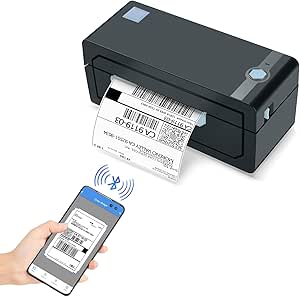 | Best for Flexible Media | Model: JD268BT | Print resolution: 203 × 203 DPI | Connectivity: Bluetooth, USB 2.0 | VIEW LATEST PRICE | See Our Full Breakdown |
| Rongta RP425 Wireless Thermal Shipping Label Printer, 4 × 6 in, White |  | Best Compact Pick | Model: RP425 | Print resolution: 203 × 203 dpi | Print speed: 15 pages per minute | VIEW LATEST PRICE | See Our Full Breakdown |
| N40 Bluetooth Thermal Shipping Label Printer |  | Best for Broad Device Compatibility | Print technology: BPA-free direct thermal | Resolution: 203 × 203 dpi | Maximum print speed: 150 mm/s | VIEW LATEST PRICE | See Our Full Breakdown |
| D450BT Bluetooth Thermal Shipping Label Printer with Built-In Label Bin |  | Best for High-Volume Label Storage | Print resolution: 203 × 203 DPI | Print speed: Up to 72 labels per minute | Connectivity: Bluetooth, USB | VIEW LATEST PRICE | See Our Full Breakdown |
| Labeer Bluetooth Thermal Shipping Label Printer, 4×6 |  | Best for Label-Handling Automation | Print technology: Direct thermal | Resolution: 203 DPI | Supported label widths: 1.57–4.41 inches | VIEW LATEST PRICE | See Our Full Breakdown |
| NULLTONEX 4×6 Bluetooth Thermal Shipping Label Printer |  | Best for a Compact, Flexible Setup | Printer type: Direct thermal | Connectivity: Bluetooth, USB | Resolution: 203 × 203 DPI | VIEW LATEST PRICE | See Our Full Breakdown |
| Phomemo 241BT Bluetooth Thermal Label Printer with 20 Labels |  | Best for Broad Device Compatibility | Printer type: Thermal | Connectivity: Bluetooth, USB | Compatible operating systems: iOS, Android, Windows, Mac OS, Chrome OS, Linux | VIEW LATEST PRICE | See Our Full Breakdown |
| labelhive Bluetooth Thermal Shipping Label Printer, 4×6 |  | Best for Handling Different Label Media | Printer type: Direct thermal | Resolution: 203 DPI | Supported label width: 1.57–4.41 inches | VIEW LATEST PRICE | See Our Full Breakdown |
| Nelko Bluetooth Thermal Shipping Label Printer, 4 × 6 | 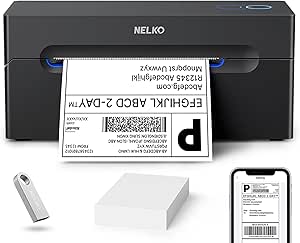 | Best for a Simple Shipping-Label Workflow | Printer type: Thermal | Connectivity: Bluetooth through the NELKO app; USB | Compatible operating systems: iOS, Android, Windows 7 or later, Mac OS, Chrome OS | VIEW LATEST PRICE | See Our Full Breakdown |
| thermal shipping label printer | Connectivity | Resolution | Dimensions | Weight |
|---|---|---|---|---|
| KNAON 4×6 Bluetooth Thermal Sh | USB; Bluetooth through FlashLabel Pro app | 203 dpi | 7.3 × 2.56 × 3.15 inches | — |
| Gloryang Bluetooth Thermal Shi | Bluetooth | 203 × 203 dpi | 8.43 × 6.5 × 5.12 inches | 1.11 kg |
| Labeer Bluetooth Thermal Shipp | USB and Bluetooth | 203 × 203 dpi | — | — |
| Rongta RP425 Bluetooth 4×6 The | Bluetooth | 203 × 203 dpi | — | 0.65 kg |
| KNAON Bluetooth Thermal Shippi | USB; Bluetooth through FlashLabel Pro app | 203 × 203 dpi | Listed as 7.17 × 3.9 × 3.43 inches and 5.46 × 2.97 × 2.61 inches | — |
| JADENS Bluetooth Thermal Shipp | Bluetooth, USB 2.0 | — | 5.91 × 9.06 × 5.91 inches | — |
| Rongta RP425 Wireless Thermal | Bluetooth, USB | — | 4 × 1 × 2 inches (D × W × H) | 16 ounces |
| N40 Bluetooth Thermal Shipping | Bluetooth, USB | 203 × 203 dpi | — | 722.5 g |
| D450BT Bluetooth Thermal Shipp | Bluetooth, USB | — | 7.3 × 6.3 × 5.35 inches | 0.97 kg |
| Labeer Bluetooth Thermal Shipp | Bluetooth, USB | 203 DPI | 7.2 × 2.64 × 3.15 inches | 450 g |
| NULLTONEX 4×6 Bluetooth Therma | Bluetooth, USB | 203 × 203 DPI | 8.08 × 4.73 × 6.9 inches | 1.2 lbs |
| Phomemo 241BT Bluetooth Therma | Bluetooth, USB | 203 × 203 DPI | — | — |
| labelhive Bluetooth Thermal Sh | Bluetooth, USB | 203 DPI | — | — |
| Nelko Bluetooth Thermal Shippi | Bluetooth through the NELKO app; USB | 203 × 203 DPI | — | — |
More Details on Our Top Picks
KNAON 4×6 Bluetooth Thermal Shipping Label Printer
USB plus app-based Bluetooth gives this KNAON more setup options than the Bluetooth-only Gloryang 668BT. That flexibility suits sellers who move between a computer and a phone, while support for Windows, macOS, ChromeOS, and Linux covers a wider range of computer setups than many compact thermal printers. Its 1.38–4.41-inch media range also reaches beyond standard 4×6 shipping labels for smaller address or inventory labels.
The tradeoff is that Bluetooth printing runs through FlashLabel Pro, not a universal direct connection; ChromeOS also needs a separate extension. The included test papers and driver-and-tutorial USB drive can make initial setup more approachable, but the printer remains a print-only monochrome device. I’d rank it ahead of the Gloryang for wired flexibility, but not for buyers who want the simplest phone-only workflow.
Pros:- USB and FlashLabel Pro Bluetooth provide two connection routes.
- Supports Windows, macOS, ChromeOS, and Linux.
- Wide 1.38–4.41-inch media range accommodates more than standard shipping labels.
- Includes test papers and a USB drive with drivers and tutorial videos.
Cons:- Mobile Bluetooth printing requires the FlashLabel Pro app.
- ChromeOS setup requires the FlashLabel extension.
- Monochrome, print-only output cannot handle color or other document tasks.
Best for: Small sellers who print from both a computer and a mobile device and need support for several operating systems and label widths.
Not ideal for: Buyers who want direct Bluetooth pairing without a companion app, or ChromeOS users who prefer not to install an extension.
- Print technology:Thermal, monochrome
- Resolution:203 dpi
- Maximum print speed:Up to 180 mm/s
- Connectivity:USB; Bluetooth through FlashLabel Pro app
- Supported operating systems:Windows 7 or later, macOS, ChromeOS, Linux
- Supported paper width:1.38–4.41 inches
- Dimensions:7.3 × 2.56 × 3.15 inches
- Included paper:20 test printing papers
Our verdict“Choose this KNAON if you value broad computer compatibility and USB backup alongside app-based mobile printing.”
Gloryang Bluetooth Thermal Shipping Label Printer (4×6, Inkless, Wireless)
The Gloryang 668BT makes the most sense for a small shipping station built around a phone or tablet: it lists Bluetooth support for iOS and Android, as well as macOS and Windows. That mobile reach is a clearer fit for phone-led workflows than the Labeer, whose computer Bluetooth support is listed for Windows and whose mobile printing depends on FlashLabel Pro. Its inkless thermal printing also avoids ink and toner supplies, though it requires compatible thermal labels.
The printer is limited to monochrome, single-sided output, and its stated label range ends at 4.1 inches, slightly narrower than the KNAON 4×6 model’s 4.41-inch maximum. The listed speed is 150 pages per minute, a unit that is not directly comparable with the millimeters-per-second figures supplied for other printers. I’d pick it for broad mobile OS support, not for buyers who need a wider media range or want to compare speed on a consistent basis.
Pros:- Bluetooth support is listed for iOS, Android, macOS, and Windows.
- Thermal printing needs no ink or toner.
- Compact, lightweight design is suited to a small home shipping desk.
- Supports label sizes from 1.57 to 4.1 inches.
Cons:- Monochrome output only.
- Requires thermal label paper rather than standard printer media.
- Listed speed uses pages per minute, making comparison with other models’ speed figures difficult.
Best for: Home-based sellers who prepare labels from iPhones or Android devices and also want Bluetooth access from a Mac or Windows computer.
Not ideal for: Shippers who need labels wider than 4.1 inches, color output, or a printer that accepts standard inkjet or laser paper.
- Model:668BT
- Print technology:Inkless thermal, monochrome
- Resolution:203 × 203 dpi
- Listed print speed:Up to 150 pages per minute
- Connectivity:Bluetooth
- Supported operating systems:iOS, Android, macOS, Windows
- Label size range:1.57–4.1 inches
- Dimensions:8.43 × 6.5 × 5.12 inches
- Weight:1.11 kg
Our verdict“Choose the Gloryang if your label workflow centers on a phone or tablet and its 4.1-inch media limit fits your labels.”
Labeer Bluetooth Thermal Shipping Label Printer
Automatic gap detection and calibration make the Labeer a practical choice for sellers who switch among label sizes or want help keeping each label aligned. It also adds paper-out and jam detection, useful feedback that the Gloryang 668BT’s listed features do not specify. Its supported formats cover common 4×6 shipping labels as well as smaller address, return, and inventory labels, with both roll and fanfold media supported.
The connection details need closer attention: Windows can connect by USB or Bluetooth, while macOS, ChromeOS, and Linux are listed for USB; mobile printing uses FlashLabel Pro over Bluetooth. That makes it less flexible for wireless computer printing than the KNAON 4×6 model, which lists Bluetooth through its app and USB across several desktop systems. At 450 g, it is especially easy to place on a crowded desk, but buyers who want wireless Mac printing should look elsewhere.
Pros:- Automatic label gap detection and calibration help keep labels aligned.
- Paper-out and jam detection provide useful feed alerts.
- Supports roll and fanfold labels, including common shipping and smaller label sizes.
- Lightweight 450 g body with USB and Bluetooth connectivity.
Cons:- Mobile printing requires the FlashLabel Pro app.
- Bluetooth computer printing is listed for Windows, not macOS, ChromeOS, or Linux.
- Monochrome print-only operation cannot replace a general-purpose printer.
Best for: Small sellers who change label formats and value automatic alignment, feed status, and jam alerts during routine shipping.
Not ideal for: Mac, ChromeOS, or Linux users who specifically need wireless computer printing, since those systems are listed for USB connectivity.
- Print technology:Direct thermal, monochrome
- Resolution:203 × 203 dpi
- Supported label widths:1.57–4.41 inches
- Supported formats:4×6, 4×4, 4×2, 2×1 inches, and custom sizes
- Media type:Roll and fanfold
- Connectivity:USB and Bluetooth
- Computer compatibility:Windows via USB or Bluetooth; macOS, ChromeOS, and Linux via USB
- Dimensions and weight:7.2 × 2.64 × 3.15 inches; 450 g
- Feed functions:Automatic gap detection and calibration; paper-out and jam detection
Our verdict“Choose the Labeer if label alignment and feed alerts matter more than wireless printing from a Mac or other non-Windows computer.”
Rongta RP425 Bluetooth 4×6 Thermal Shipping Label Printer
The Rongta RP425 stands out for automatic label detection and feeding, which can reduce manual alignment when you load different direct-thermal media. Its 0.98–4.37-inch width range is broader at the narrow end than the Gloryang 668BT’s, so it can handle small labels as well as standard shipping formats. It also lists compatibility with Windows, macOS, ChromeOS, iOS, and Android, giving it a wide range of possible setups.
Mobile printing runs through the RONGTA app, much like the KNAON and Labeer models rely on their own companion apps; this is not a universal Bluetooth workflow. The RP425’s listed speed is 150 mm/s, below the KNAON models’ stated 180 mm/s, though speed alone does not tell the full story of a shipping setup. One spec sheet gives conflicting dimensions, so I’d verify the unit’s footprint before reserving desk space.
Pros:- Automatic label detection and feeding support use with varied media widths.
- Supports Windows, macOS, ChromeOS, iOS, and Android.
- 0.98–4.37-inch width range accommodates small labels as well as shipping labels.
- Direct thermal operation avoids ink, toner, and ribbons.
Cons:- iOS and Android printing requires the RONGTA app.
- Listed maximum speed of 150 mm/s is lower than the 180 mm/s specified for the KNAON models.
- Product information lists conflicting dimensions, making desk-fit planning less certain.
Best for: Small businesses that load different label widths and want automatic media detection across mobile and desktop operating systems.
Not ideal for: Buyers who want clearly documented dimensions or prefer mobile printing without a brand-specific app.
- Model:RP425
- Printing method:Direct thermal, monochrome
- Resolution:203 × 203 dpi
- Maximum print speed:Up to 150 mm/s
- Connectivity:Bluetooth
- Compatible operating systems:Windows 7 or newer, macOS 10.11 or newer, Chrome OS, iOS, Android
- Compatible label width:0.98–4.37 inches
- Weight:0.65 kg
- Warranty:1 year
Our verdict“Choose the RP425 if automatic feeding and broad OS compatibility matter more than app-free mobile printing or precise footprint information.”
KNAON Bluetooth Thermal Shipping Label Printer, 4 × 6 in, Pink
This pink KNAON is the design-focused sibling in this group: its FlashLabel Pro app resources include templates, icons, and fonts for customizing labels, while USB remains available for computer connections. Compared with the other KNAON, it lists a slightly narrower 1.5–4.2-inch paper range and includes 10 test papers rather than 20. Its stated maximum speed matches that model at 180 mm/s, so the main distinction is the app-led design emphasis and the pink finish, not a clear speed advantage.
As with the black KNAON, Bluetooth printing depends on the companion app and ChromeOS requires an extension. The product information also gives two different dimension sets, which makes it harder to judge how it will fit beside packing supplies. I’d choose this version over the Rongta RP425 for template options, but choose the Rongta if automatic label detection and feeding are a higher priority.
Pros:- FlashLabel Pro offers templates, icons, and fonts for label customization.
- Supports USB and Bluetooth through the companion app.
- Works with Windows, macOS, ChromeOS, and Linux.
- Print speed is listed up to 180 mm/s.
Cons:- Bluetooth printing requires FlashLabel Pro, and ChromeOS needs an extension.
- Supported paper width tops out at 4.2 inches, narrower than the other KNAON model’s 4.41-inch maximum.
- Product information gives two conflicting dimension sets.
Best for: Home sellers who want to personalize labels in an app and prefer a pink printer with both USB and app-based Bluetooth.
Not ideal for: Buyers who need reliable footprint measurements, a wider-than-4.2-inch media range, or direct Bluetooth pairing without an app.
- Print technology:Thermal, monochrome
- Resolution:203 × 203 dpi
- Maximum print speed:Up to 180 mm/s
- Connectivity:USB; Bluetooth through FlashLabel Pro app
- Compatible operating systems:Windows 7 or later, macOS, ChromeOS, Linux
- Supported paper width:1.5–4.2 inches
- Dimensions:Listed as 7.17 × 3.9 × 3.43 inches and 5.46 × 2.97 × 2.61 inches
- Color:Pink
- Included test paper:10 sheets
Our verdict“Choose this pink KNAON if app-based label design is your priority and its narrower media range and uncertain dimensions suit your setup.”
JADENS Bluetooth Thermal Shipping Label Printer, 4×6
The JADENS JD268BT suits sellers who want to switch between roll and fanfold labels without buying a printer tied to one feed style. Its Bluetooth and USB connections cover phone and computer workflows, though phone printing runs through the JADENS app rather than direct Bluetooth printing. Compared with the Rongta RP425, JADENS spells out a broader 1.57–4.1-inch label-width range and support for both media formats, giving it more flexibility for mixed shipping and small-label tasks. The tradeoff is setup friction: changing label sizes requires recalibration, and its 203 DPI monochrome output is suited to shipping information and barcodes, not color graphics. A one-year limited warranty and included setup materials may help new owners get started, but buyers who prioritize fewer app constraints should compare its mobile workflow carefully.
Pros:- Accepts both fanfold and roll labels, supporting more than one workspace setup.
- Bluetooth and USB provide phone and computer connection options.
- Prints without ink or toner, reducing consumable changes.
- Works with Windows and macOS and supports mobile printing through the JADENS app.
Cons:- Mobile printing requires the JADENS app, and phones do not print through Bluetooth directly.
- Changing label sizes requires recalibration.
- Monochrome 203 DPI output is limited to basic label graphics and text.
Best for: Small online sellers who alternate between fanfold and roll labels and print from both phones and computers.
Not ideal for: Phone-first shippers who want to print over Bluetooth without a dedicated app or who frequently switch label sizes and want to avoid recalibration.
- Model:JD268BT
- Print resolution:203 × 203 DPI
- Connectivity:Bluetooth, USB 2.0
- Supported label width:1.57–4.1 inches
- Maximum media size:4 × 6 inches
- Media types:Fanfold labels, roll labels
- Compatible systems:Windows 7 or newer, macOS 10.9 or newer; Android and iOS via JADENS Printer app
- Dimensions:5.91 × 9.06 × 5.91 inches
- Warranty:One-year limited warranty
Our verdict“Choose the JADENS if you need both roll and fanfold media, but skip it if app-based phone printing or repeated recalibration will slow your workflow.”
Rongta RP425 Wireless Thermal Shipping Label Printer, 4 × 6 in, White
The Rongta RP425 is the lineup’s compact, lightweight choice for a desk where printer footprint matters more than a long feature list. It supports Bluetooth printing from phones through the RONGTA app and USB connections to computers, so it can fit a mixed-device shipping station. Compared with the JADENS JD268BT, the RP425 clearly targets portability and a simple 4 × 6-inch shipping-label role rather than emphasizing a wider range of label widths or both roll and fanfold media. Its stated 15 pages-per-minute speed gives buyers a throughput reference, but the product data does not specify a broader media-width range. The main constraints are its monochrome output and dependence on thermal paper; buyers needing varied label formats or clearer media flexibility may prefer the JADENS or N40.
Pros:- Compact, lightweight design is easier to fit into a small packing area.
- Bluetooth supports phone printing through the RONGTA app.
- USB connection provides a computer-printing option.
- Thermal printing avoids ink and toner supplies.
Cons:- Monochrome printing cannot produce color labels.
- The listed media is thermal paper, with no stated support for both roll and fanfold formats.
- Phone printing depends on the RONGTA app.
Best for: Apartment-based marketplace sellers and occasional shippers who need a lightweight printer for standard shipping labels and phone-based jobs.
Not ideal for: High-volume sellers or businesses that need explicit support for multiple label widths and media formats beyond standard thermal paper.
- Model:RP425
- Print resolution:203 × 203 dpi
- Print speed:15 pages per minute
- Maximum media size:4 × 6 inches
- Connectivity:Bluetooth, USB
- Compatible devices:Laptops, PCs, smartphones, tablets
- Weight:16 ounces
- Dimensions:4 × 1 × 2 inches (D × W × H)
- Warranty:One-year manufacturer warranty
Our verdict“Pick the RP425 for a compact standard-label station with phone and USB printing, but choose a more media-flexible model for varied label formats.”
N40 Bluetooth Thermal Shipping Label Printer
The N40 is the strongest fit here for sellers whose computers span more than one operating system: it lists Windows, macOS, and Linux via USB, alongside Bluetooth printing from iOS and Android devices. That is a broader stated computer compatibility set than the JADENS JD268BT, which lists Windows and macOS, and it comes with 20 4 × 6-inch labels for an initial run. Its 150 mm/s maximum speed and automatic calibration are aimed at keeping repeated shipping jobs moving, while support for roll and fanfold labels adds practical flexibility. Still, changing label sizes calls for calibration, and the print head may need regular cleaning to preserve clarity. Its 203 DPI monochrome output is standard for shipping labels, not a reason to choose it for graphic-heavy work.
Pros:- USB support covers Windows, macOS, and Linux, with Bluetooth for iOS and Android.
- Supports both roll and fanfold labels from 1 to 4.2 inches wide.
- Maximum speed of 150 mm/s is suited to recurring shipping batches.
- Includes 20 4 × 6-inch labels and automatic calibration.
Cons:- Label size needs recalibration when changing media.
- The print head may need regular cleaning to maintain print clarity.
- 203 DPI monochrome output is limited for detailed or color-rich label designs.
Best for: Small businesses using a mix of Linux, Mac, Windows, and mobile devices that want one printer for roll or fanfold shipping labels.
Not ideal for: Sellers who want a low-maintenance printer for frequent label-size changes or color and fine-detail label printing.
- Print technology:BPA-free direct thermal
- Resolution:203 × 203 dpi
- Maximum print speed:150 mm/s
- Connectivity:Bluetooth, USB
- Compatible systems:iOS, Android, Windows 7 and above, macOS, Linux
- Supported label width:1–4.2 inches (25–110 mm)
- Media types:Fanfold labels, roll labels
- Weight:722.5 g
- Package contents:Printer, 20 4 × 6-inch labels, power adapter, Type-C cable, USB Type-A to Type-C adapter, user manual
Our verdict“Choose the N40 if your shipping station spans several operating systems and media types, provided you are comfortable with periodic cleaning and recalibration.”
D450BT Bluetooth Thermal Shipping Label Printer with Built-In Label Bin
The D450BT stands apart through its built-in bin for up to 250 labels, which can keep a larger supply close to the printer instead of relying on a separate holder. Its stated capacity and speed of up to 72 labels per minute make it a better match for recurring batch work than the compact Rongta RP425, whose listed appeal is a lightweight footprint. Automatic label alignment may also reduce wasted stock when jobs are moving quickly. The D450BT accepts roll or folded paper and offers a wider maximum label width of 4.6 inches than the standard 4 × 6-inch focus of several options here. The tradeoffs are a monochrome-only output and reliance on thermal labels; buyers printing only occasional parcels may not benefit much from its larger built-in capacity.
Pros:- Built-in bin holds up to 250 labels, reducing the need for a separate label holder.
- Supports labels up to 4.6 inches wide and roll or folded paper.
- Automatic alignment helps reduce misfed or wasted labels.
- Bluetooth and USB support mobile and computer workflows.
Cons:- Monochrome printing does not support color label designs.
- Requires thermal labels rather than ordinary paper.
- The built-in high-capacity bin may be unnecessary for occasional shipping.
Best for: Small fulfillment teams and frequent marketplace sellers who want a sizeable label supply stored inside the printer for batch shipping.
Not ideal for: Occasional shippers with limited desk space or buyers who need color output rather than monochrome thermal labels.
- Print resolution:203 × 203 DPI
- Print speed:Up to 72 labels per minute
- Connectivity:Bluetooth, USB
- Supported label width:1–4.6 inches (25.4–117 mm)
- Maximum label capacity:250 labels
- Media:Rolls or folded paper
- Compatible systems:Android, iOS, Windows, macOS, Linux, ChromeOS
- Dimensions:7.3 × 6.3 × 5.35 inches
- Weight:0.97 kg
Our verdict“Choose the D450BT for frequent batch shipping where built-in label storage and a wider media limit matter more than color or a minimal setup.”
Labeer Bluetooth Thermal Shipping Label Printer, 4×6
The Labeer is the best fit for sellers who want practical safeguards during repeated label jobs: automatic gap detection and calibration, plus paper-out and jam detection, pause and resume, and job cancellation. Those controls give it a different emphasis from the N40, which lists automatic calibration but calls out print-head cleaning as a maintenance task. Labeer also supports several common label sizes, from 2 × 1 inches to 4 × 6 inches, and accepts both roll and fanfold stock. Its light 450 g body is easy to place in a compact packing area. The catch is software dependence: phone printing uses FlashLabel Pro, while Mac, ChromeOS, and Linux connections are USB-only. Buyers who need broad wireless access from those systems should look elsewhere.
Pros:- Automatic gap detection and calibration support more consistent label feeding.
- Paper-out and jam detection, pause/resume, and job cancellation provide useful job controls.
- Supports multiple label sizes and both roll and fanfold media.
- Lightweight 450 g design is easy to position on a small workstation.
Cons:- Phone printing requires the FlashLabel Pro app.
- Mac, ChromeOS, and Linux connections are via USB rather than Bluetooth.
- Monochrome 203 DPI output cannot produce color labels.
Best for: Small online sellers printing shipping, return, barcode, and inventory labels in different sizes who value detection and job-control features.
Not ideal for: Mac, ChromeOS, or Linux users who need wireless printing, and phone users who prefer not to install a dedicated printing app.
- Print technology:Direct thermal
- Resolution:203 DPI
- Supported label widths:1.57–4.41 inches
- Supported label sizes:4 × 6, 4 × 4, 4 × 2, 2 × 1 inches, and custom sizes
- Connectivity:Bluetooth, USB
- Compatible devices:iPhone, Android, Windows, macOS, ChromeOS, Linux
- Media:Roll and fanfold thermal labels
- Weight:450 g
- Dimensions:7.2 × 2.64 × 3.15 inches
Our verdict“Choose Labeer if you print varied label sizes and want automated feed checks, but skip it if wireless printing from Mac, ChromeOS, or Linux is a priority.”
NULLTONEX 4×6 Bluetooth Thermal Shipping Label Printer
The NULLTONEX pairs a small footprint with Bluetooth and USB, making it a flexible fit for a home shipping station that may move between a laptop and a phone. Its 1.57–4.3-inch label range handles standard 4×6 shipping labels as well as narrower formats, and direct thermal printing avoids ink and toner. At up to 150 mm/s, its stated speed matches the Phomemo 241BT, while the NULLTONEX is lighter at 1.2 pounds. The Phomemo accepts slightly wider labels and supports more listed operating systems, so it may suit a mixed-device household better. One practical tradeoff here is that USB is the steadier choice when wireless interference could interrupt work; output is monochrome, and the included 25 labels are only a starter supply.
Pros:- Direct thermal operation avoids ink and toner purchases.
- Bluetooth and USB support phone and computer workflows.
- Accepts label widths from 1.57 to 4.3 inches.
- Compact 1.2-pound body and printhead overheat protection.
Cons:- Monochrome output cannot produce color labels.
- USB may be preferable for a steadier connection than Bluetooth.
- The included 25 labels provide only a small initial supply.
Best for: Home shippers who want a lightweight printer for standard 4×6 labels plus occasional narrower labels, with both phone and computer connection options.
Not ideal for: Buyers who need color printing, a wide-format label range, or a reliably wireless-only workflow in an interference-prone workspace.
- Printer type:Direct thermal
- Connectivity:Bluetooth, USB
- Resolution:203 × 203 DPI
- Print speed:Up to 150 mm/s (72 labels per minute)
- Label width:1.57–4.3 inches
- Weight:1.2 lbs
- Dimensions:8.08 × 4.73 × 6.9 inches
- Included:Power cord, USB cable, 25 sheets of 4 × 6 thermal labels
Our verdict“Choose the NULLTONEX for a compact home setup that needs flexible label widths and both wireless and wired connections.”
Phomemo 241BT Bluetooth Thermal Label Printer with 20 Labels
The Phomemo 241BT is a strong fit for households or small businesses that print from a mix of computers and mobile devices: its listed compatibility spans iOS, Android, Windows, Mac OS, Chrome OS, and Linux. Bluetooth and USB offer a choice between mobile convenience and a wired desktop setup, while the 1–4.6-inch label range is broader than the NULLTONEX’s 1.57–4.3 inches. Both models print at 203 DPI and 150 mm/s, so the Phomemo’s distinction is compatibility and media width, not a faster stated pace. The setup has some friction, though: phones and tablets require the Labelife app, and computers may need a driver. It prints monochrome only, and its 20 included labels mean less starter media than the NULLTONEX supplies.
Pros:- Listed support for six major operating systems.
- Bluetooth and USB provide mobile and desktop connection options.
- Broad 1–4.6-inch label-width support.
- Direct thermal printing requires no ink or toner.
Cons:- Mobile printing requires the Labelife app.
- Computer use may require installing a driver.
- Monochrome output and 20 included labels limit color use and initial supply.
Best for: Small sellers using a mix of iOS, Android, Windows, Mac, Chrome OS, or Linux devices who want one printer for different label widths.
Not ideal for: Buyers who want app-free phone printing or the simplest plug-and-print computer setup.
- Printer type:Thermal
- Connectivity:Bluetooth, USB
- Compatible operating systems:iOS, Android, Windows, Mac OS, Chrome OS, Linux
- Label width:1–4.6 inches
- Maximum media size:4 × 6 inches
- Resolution:203 × 203 DPI
- Print speed:150 mm/s
- Weight and dimensions:720 g; 6.3 × 8.66 × 4.41 inches
- Included labels:20
Our verdict“Pick the Phomemo 241BT if device compatibility and a broad range of label widths matter more than app-free setup.”
labelhive Bluetooth Thermal Shipping Label Printer, 4×6
The labelhive stands out for media flexibility: it accepts both rolls and fanfold labels, with widths from 1.57 to 4.41 inches. That gives it a practical advantage over the Nelko, whose listed maximum width is 4.1 inches, when a shipping operation uses varied stock. Its automatic calibration and jam detection can also reduce manual adjustments and help flag interrupted jobs. Bluetooth supports mobile printing and Windows computers, while USB covers desktop setups. The connection rules are less flexible than the Phomemo 241BT’s broad operating-system list suggests: macOS, ChromeOS, and Linux use USB, and mobile printing requires the FlashLabel Pro app. At 2 pounds, it is also heavier than the NULLTONEX. The one-year limited warranty adds a defined coverage period, but color printing is not an option.
Pros:- Supports both roll and fanfold thermal labels.
- Accepts label widths from 1.57 to 4.41 inches.
- Automatic calibration, paper-out, and jam detection aid job handling.
- Bluetooth and USB connections, with a one-year limited warranty.
Cons:- Mobile printing requires the FlashLabel Pro app.
- macOS, ChromeOS, and Linux connectivity is limited to USB.
- At 2 pounds, it is heavier than the NULLTONEX.
Best for: Small shipping operations that alternate between roll and fanfold labels and want calibration and jam detection to help manage routine jobs.
Not ideal for: Mac, ChromeOS, or Linux users who specifically need Bluetooth, or mobile users who prefer printing without a dedicated app.
- Printer type:Direct thermal
- Resolution:203 DPI
- Supported label width:1.57–4.41 inches
- Connectivity:Bluetooth, USB
- Compatible devices:iPhone, Android, Windows, macOS, ChromeOS, Linux
- Media types:Roll and fanfold thermal labels
- Weight and dimensions:2 pounds; 7.2 × 2.4 × 3.15 inches
- Warranty:1-year limited
Our verdict“Choose labelhive when mixed roll and fanfold media and printer-side job detection matter more than wireless support across every computer platform.”
Nelko Bluetooth Thermal Shipping Label Printer, 4 × 6
The Nelko focuses on familiar shipping-label sizes and straightforward wired desktop use, with Bluetooth available for iOS and Android through the NELKO app. Its stated pace of up to 72 4×6 labels per minute makes it a plausible fit for sellers preparing batches, while support for roll and fanfold stock helps accommodate different workspaces. Compared with labelhive, the Nelko has a narrower maximum label width—4.1 inches versus 4.41—and lacks listed jam-detection features, but its mobile connection is clearly aimed at the two leading phone platforms. Mac users need USB, and phone printing depends on the app, so it is less convenient for anyone expecting unrestricted wireless printing. As with the other printers here, output is monochrome and requires thermal labels.
Pros:- Prints up to 72 standard 4×6 labels per minute according to the product data.
- Supports roll and fanfold thermal labels.
- Bluetooth phone printing and USB computer printing are available.
- Thermal printing requires no ink or toner.
Cons:- Bluetooth printing requires the NELKO app.
- Mac OS printing is supported only over USB.
- Maximum supported width of 4.1 inches is narrower than labelhive’s 4.41 inches.
Best for: Home sellers and small shops that mostly print 4×6 labels, use iOS or Android phones, and can connect a Mac or computer by USB.
Not ideal for: Users who need wireless printing from a Mac, ChromeOS, or a wider mix of computer systems, or who print labels wider than 4.1 inches.
- Printer type:Thermal
- Connectivity:Bluetooth through the NELKO app; USB
- Compatible operating systems:iOS, Android, Windows 7 or later, Mac OS, Chrome OS
- Print speed:Up to 72 4 × 6 labels per minute
- Resolution:203 × 203 DPI
- Label width:1.54–4.1 inches (40–104 mm)
- Print media:Fanfold and roll labels
- Weight and dimensions:1.4 kg; 9 × 5 × 6 inches
Our verdict“The Nelko suits sellers who mainly print standard 4×6 labels and are comfortable using its app for phone printing and USB for desktop work.”

How We Picked
I ranked these thermal shipping label printers around the work buyers need them to do: produce commonly used 4×6 shipping labels, fit a realistic home or small-business setup, and connect to the devices and services a seller relies on. I gave more weight to practical differences a buyer can verify—such as Bluetooth connectivity, included labels, a built-in label bin, and clearly stated format or bundle details—than to broad claims that do not explain how the printer fits a shipping workflow.
The top positions go to options with a useful balance of everyday fit and identifiable advantages; specialized conveniences matter, but they do not automatically make a printer the best choice for everyone. Several models have closely overlapping names and feature descriptions, including duplicate-looking Rongta and Labeer entries, so I treat exact listing, bundle, compatibility, and support details as items buyers should confirm before purchase. Where the available product information does not establish a meaningful performance advantage, I avoid presenting one as proven.
| thermal shipping label printer | Connectivity |
|---|---|
| KNAON 4×6 Bluetooth Thermal Sh | USB; Bluetooth through FlashLabel Pro app |
| Gloryang Bluetooth Thermal Shi | Bluetooth |
| Labeer Bluetooth Thermal Shipp | USB and Bluetooth |
| Rongta RP425 Bluetooth 4×6 The | Bluetooth |
| KNAON Bluetooth Thermal Shippi | USB; Bluetooth through FlashLabel Pro app |
| JADENS Bluetooth Thermal Shipp | Bluetooth, USB 2.0 |
| Rongta RP425 Wireless Thermal | Bluetooth, USB |
| N40 Bluetooth Thermal Shipping | Bluetooth, USB |
| D450BT Bluetooth Thermal Shipp | Bluetooth, USB |
| Labeer Bluetooth Thermal Shipp | Bluetooth, USB |
| NULLTONEX 4×6 Bluetooth Therma | Bluetooth, USB |
| Phomemo 241BT Bluetooth Therma | Bluetooth, USB |
| labelhive Bluetooth Thermal Sh | Bluetooth, USB |
| Nelko Bluetooth Thermal Shippi | Bluetooth through the NELKO app; USB |
Factors to Consider When Choosing Thermal Shipping Label Printers
Before choosing among similar-looking 4×6 thermal printers, I would work backward from the shipping routine: which device creates labels, what software prints them, where label stock will sit, and how often shipments go out. Those details can matter more than color or a familiar feature phrase.
Check the Full Device-to-Platform Path
Bluetooth on a product listing does not by itself confirm that a printer will work with every phone, computer, or shipping service. Check the manufacturer’s compatibility details for your operating system and the apps or platforms you plan to print from. A seller who prints from a desktop may care more about a supported computer connection than phone pairing, while a mobile-first seller should verify app requirements before buying. A common mistake is to confirm that a device has Bluetooth but not that the chosen shipping workflow can send labels to it. If multiple people will print, check whether setup can be repeated without a complicated re-pairing routine. I would treat compatibility as a pass-or-fail requirement, not a feature to trade against a lower price or a preferred color.
Match Label Size and Stock to Your Shipping Mix
The repeated 4×6 format across this group suits many parcel-label workflows, but it may not cover every label task in a small business. Before ordering, compare the printer’s supported widths and media types with carrier labels, return labels, product labels, or other formats you actually use. Do not assume that a roll or fanfold stack will feed just because its label dimensions look right; the printer’s supported loading method matters too. Sellers who use only standard parcel labels can prioritize a simple 4×6 setup, while mixed-use businesses should verify whether switching stock is practical. Buying for a format you rarely use can add setup friction without improving daily shipping. Confirm the exact specifications for the listing and label stock you plan to buy.
Think About Label Storage and Workspace
A printer’s footprint is only part of its space requirement: the label roll or stack also needs room to feed cleanly. The D450BT’s built-in label bin offers a more contained arrangement, but a bin is less useful if your preferred stock or work surface does not fit its layout. Printers without an integrated bin may need extra desk space or a separate holder, especially when labels feed from outside the unit. Measure the area around the printer, not just the device itself, and leave space for loading and clearing labels. A compact setup can be worth more than a longer feature list for a shared desk or small packing station. For frequent shipping, place stock where it stays clean and does not snag during feeding.
Separate Starter Supplies From Ongoing Costs
An included label pack can make initial setup easier, as with the Phomemo 241BT’s 20 labels, but it says little about the ongoing cost or availability of compatible stock. Check which label types the printer accepts and whether you can source replacements in the quantity and format your shipping volume requires. A small starter supply is useful for testing alignment and printing a few early shipments; it is not a reason to ignore recurring consumable needs. Also check whether the listing includes a roll holder, adapter, or other pieces your chosen label format needs. Buyers sometimes focus on the printer and discover later that their preferred labels need a separate accessory. Compare the whole operating setup, not just what is in the box on day one.
Estimate Volume Before Paying for Convenience
For occasional shipments, simple setup and easy access to compatible labels may matter more than features aimed at a busy packing station. At higher volumes, interruptions from reloading, repeated pairing, or unclear maintenance instructions can become more costly than a small difference in the printer itself. Think about your busiest shipping day rather than your average week, then check whether the printer’s stated duty guidance and support information suit that workload. A built-in bin can reduce clutter, but it does not establish faster printing or greater durability on its own. Avoid paying extra for a feature that does not remove a real bottleneck in your process. If volume is central to the decision, seek clear manufacturer specifications instead of inferring capacity from Bluetooth or 4×6 support.
Review Setup, Maintenance, and Support Details
Thermal printing avoids ink cartridges, but the printer still needs compatible labels, correct loading, and a clean print path. Before purchase, look for clear instructions on driver or app setup, label calibration, troubleshooting, and cleaning. These details are especially useful for beginners, who may mistake a misaligned label or incorrect page setting for a faulty printer. Check the seller or manufacturer’s support route and warranty terms rather than assuming all similarly described models provide the same help. Listings with similar names can also differ by bundle or connection details, so compare the precise model and included accessories. A little time spent verifying support can prevent a frustrating first shipping session.
Frequently Asked Questions
Will a Bluetooth thermal label printer work with my shipping platform?
It may, but Bluetooth support alone does not confirm that a specific app or platform can print to that model. Check the printer’s compatibility list, required app or driver, and supported operating systems against the exact device you use. If you create labels on a computer, verify computer support rather than relying on a phone-focused setup description. For a business with multiple devices, confirm how each one pairs and prints before committing. I would make this check before comparing secondary features.
Should I choose a printer with a built-in label bin?
A built-in bin can keep label stock more contained and may suit a tidy desk or compact packing station. It is not automatically the right choice: confirm that the bin fits the type and size of labels you plan to use, and that it does not make loading awkward in your workspace. If your labels feed from a separate roll holder or you print only occasionally, an integrated bin may not solve a problem you have. Compare the complete footprint, including room for feeding labels, rather than the printer body alone. The D450BT is the distinct bin-focused option in this roundup.
Are the included labels enough to get started?
Included labels can help with initial setup and a few early shipments, but the Phomemo 241BT’s 20-label supply should be treated as a starter amount. Check the compatible label format and how replacements are sold before choosing a printer. You may want extra stock on hand if you ship regularly or need time to test alignment and print settings. Also confirm whether the bundle includes any holder or other accessory needed for your preferred labels. The printer’s long-term fit depends on the supply options, not just the first pack.
Can one of these printers handle labels other than standard 4×6 shipping labels?
Do not assume so from a 4×6 listing alone. The supported label width, feed style, and media types vary by model, so check the manufacturer’s specifications for every format you plan to print. If you need product labels or smaller return labels as well as parcel labels, confirm that changing stock is supported and practical. A printer that fits one common shipping format may still be a poor match for a mixed-label workflow. When several label types are essential, prioritize verified format support over color or included starter supplies.
How should I choose between similar listings or repeated model names?
Compare the exact model number, connection options, included supplies, color, supported labels, and warranty details shown on each listing. This matters here because the lineup includes two Rongta RP425 listings and two Labeer entries with similar naming. A different finish or bundle does not prove that the underlying printer has different performance, and similar titles do not prove the listings are identical. Check the seller’s full specifications and accessory list before ordering. If a detail that matters to your workflow is unclear, choose a listing or manufacturer page that states it plainly.
Conclusion
My best overall recommendation is the JADENS Bluetooth 4×6 printer for buyers who want a straightforward wireless option, provided their device and platform are supported. For best value in practical convenience, I would look at the Phomemo 241BT if its included 20 labels suit your immediate setup needs; the D450BT is the best fit for buyers who want built-in label storage. Beginners should prioritize clear app or driver instructions and verified compatibility over cosmetic differences, then compare the JADENS and Phomemo listings against those needs. I would call the D450BT the premium-style pick only for shoppers who will use its integrated bin; the listed information does not establish a general performance premium. For specific needs, choose the Rongta RP425 or Labeer listing only after checking the exact version and bundle, and pick among the remaining options by confirmed device support, label format, and workspace fit.