🔍 Read the full analysis: Can These 13 AI Meeting Transcription Tools Make Notes Clearer In 2027? on ThorstenMeyerAI.com
TL;DR
A roundup from ThorstenMeyerAI.com compares 13 meeting transcription options, from the desk-oriented HiDock H1E to Philips SpeechExec software and wearable recorders. It is a buyer’s guide, not a test proving which produces the most accurate notes: product descriptions do not establish accuracy, integrations or subscription terms.
ThorstenMeyerAI.com has compared 13 meeting transcription tools, including desk hardware, portable recorders, wearables and transcription software, for people weighing how to turn conversations into notes. The original roundup ranks the HiDock H1E first for a desk-based meeting workflow and Philips SpeechExec for buyers seeking dedicated transcription software, but it does not establish which tool delivers the most accurate transcripts.
The comparison focuses on how a user captures a meeting and moves from audio to usable notes. Its stated criteria include recording access, transcription and summary features, ease of moving notes out of a device, form factor, app dependence, storage and translation claims. The author says the products are not interchangeable and that more storage or a longer feature list does not by itself make a tool a better fit, a point also explored in this guide to meeting transcription recorders.
The roundup places the HiDock H1E first because it combines meeting-note capture with a desk dock. It names Philips SpeechExec as the dedicated software choice and identifies the Fieldy 3, a wristband recorder and an Apple Watch-band recorder as hands-free options for people recording away from a desk. Other formats in the lineup include pocket recorders and a pen-shaped device.
The source does not provide reported accuracy scores or a head-to-head transcription test. It says product listings do not establish transcription accuracy, supported integrations or subscription terms, and advises checking those details before committing. The article also recommends testing a representative recording, because background noise, overlapping voices, accents and specialist vocabulary can affect results; other transcription tool comparisons can help readers evaluate available options.
The 13 picks
- 1
 Gem AI Voice Recorder for Apple Watch BandsView on Amazon →
- 2
 AI Voice Recorder with Automatic Transcription and Real-Time TranslationView on Amazon →
- 3
 Philips SpeechExec Transcribe Software, 2-Year Subscription, Version 11.5View on Amazon →
- 4
 Tupuniu AI Voice Recorder with 64GB Storage and TranscriptionView on Amazon →
- 5
 DOWAY AI Voice Recorder and Note Taker, 64GB, Silver GrayView on Amazon →
- 6
 Fieldy 3 AI Wearable Transcriber, BlackView on Amazon →
- 7
 Wearable AI Voice Recorder Wristband with Transcription, Summaries, and Mind…View on Amazon →
- 8
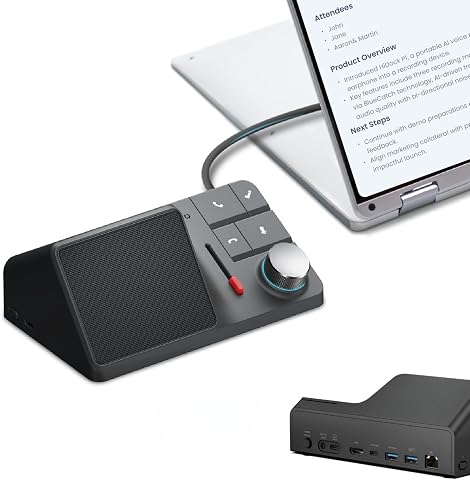 HiDock H1E AI Meeting Note-Taker and 8-in-1 Docking StationView on Amazon →
- 9
 Neyes AI Voice Recorder Pen with Transcription and Real-Time TranslationView on Amazon →
- 10
 viaim NoteKit AI Meeting Voice RecorderView on Amazon →
- 11
 NOTEVOX AI Voice Recorder with 128GB Storage and Transcription AppView on Amazon →
- 12
 RECPOINT AI Voice Recorder with Transcription and SummarizationView on Amazon →
- 13
 AI Voice Recorder with Magnetic Back, Transcription, Summaries, and TranslationView on Amazon →
Choosing for the Whole Meeting Workflow
The comparison highlights a practical choice that can matter more than a long feature list: where and how people record meetings. A desk dock may suit someone who works mainly at one workstation, while a pocket recorder or wearable could better match meetings that move between rooms or take place with clients. Software-first tools avoid choosing a dedicated recorder but may require users to set up a different capture process.
There is also a gap between having a transcript feature and getting dependable meeting notes. Buyers may need speaker labels, searchable text, summaries, export options or translation, and these features solve different problems. A summary still needs review against the audio, especially when it records decisions, names or action items. The source’s emphasis on checking the whole recording-to-sharing workflow is relevant to teams deciding whether a tool will fit existing habits.
Privacy and recording practice matter as well. The roundup advises checking how recording starts and stops and whether the device visibly indicates capture. It does not set out legal rules or establish how each product handles audio, so readers should check the relevant product information and their organization’s policies before recording conversations.
Popular right now

KitchenAid Classic Series 4.5-Quart Tilt-Head Stand Mixer, Onyx Black

De'Longhi Magnifica Duo Fully Automatic Espresso Machine with Milk Frother, Silver

Ninja Luxe Café Mini Plus Espresso and Coffee Maker with AutoFroth, Bone & Champagne
As an affiliate, we earn on qualifying purchases.
How the 13 Picks Were Ranked
The author says the ranking reflects each product’s suggested use and workflow, rather than a controlled comparison of transcript quality. The HiDock H1E leads because its desk setup is paired with a meeting-note purpose; Philips SpeechExec follows for people prioritizing transcription software. The other products are ordered around their formats and stated features, not a claim that their transcripts are better or worse.
The source distinguishes between dedicated hardware and software-first workflows. Hardware can make capture convenient, but may depend on a companion app or product ecosystem. Software may avoid dedicated recording equipment while requiring additional setup. It also cautions that storage capacity alone is not a measure of usefulness: a device’s storage must suit how the user transfers, organizes and transcribes recordings.
Translation also needs closer inspection. A listing may refer to live translation, translation after recording or translation of an existing transcript. Those are different functions. The roundup says buyers should confirm supported languages and when translation occurs, rather than treating a general translation claim as proof that a tool supports their meeting needs.
„“Hardware and software solve different problems.”“
— ThorstenMeyerAI.com roundup
Accuracy, Pricing and Features Unverified
The source does not say that the 13 products were tested against the same recordings, nor does it report accuracy measurements, error rates or a verified best performer. Its ranking is based on the described use cases and stated features. Readers should treat it as a comparison guide, not proof that one option will produce clearer notes in every setting.
It is also unclear from the source what each product currently charges, whether a subscription is needed, which integrations are available, and how audio is processed or stored. The roundup does not list full language support, live-versus-after-recording translation details or conditions for each feature. Those details may vary by product or plan and should be confirmed with the vendors.
The headline’s 2027 framing is a question about prospective usefulness, not evidence of a 2027 test or forecast. The source supplies no publication date, evaluation period or independent validation. It remains unclear whether product specifications and availability will be unchanged in 2027.
What Buyers Should Check Before Choosing
The source’s next step for readers is to compare a product’s full workflow with their own: start and stop recording, retrieve the transcript, review uncertain passages and share notes. Before buying, confirm current pricing, subscription requirements, supported integrations and data handling with the manufacturer or seller. For translation, verify the exact language pair and whether it works live or after the recording.
Where transcript accuracy is important, the roundup recommends testing a representative recording with the team’s typical room conditions, accents and technical terms. Users should check whether playback is available beside the transcript and whether speaker identification meets their needs. The article provides no announced testing milestone or product update; which tools produce clearer notes remains a question for individual trials.
Key Questions
Which tool does the roundup rank first?
It ranks the HiDock H1E first, citing its combination of meeting-note capture and a desk dock. That ranking reflects the article’s stated workflow criteria, not a published accuracy test.
Is Philips SpeechExec a recorder?
The roundup describes Philips SpeechExec as its dedicated transcription software option, rather than presenting it as a wearable or desk recorder.
Does the comparison prove which tool is most accurate?
No. The source provides no head-to-head accuracy scores and says product listings do not establish transcription accuracy. It recommends testing a representative recording before relying on a transcript.
What should buyers verify about translation?
Check the supported language pairs and whether translation happens live, after recording, or by translating an existing transcript. Those functions are not interchangeable.
Does the roundup confirm 2027 prices or subscription terms?
No. The source says subscription terms are not established by product listings and does not provide verified prices. Buyers should check current terms with each vendor.
Source: ThorstenMeyerAI.com