For retail inventory, I’d put the Zebra CS6080 first for its flexible handheld format and 1D/2D scanning, with the Honeywell Voyager XP 1472g standing out for wireless work and the NetumScan NS7060 for fast counter scanning. The right choice depends on whether staff scan items at a fixed checkout, move around the stockroom, or need to read 2D codes as well as traditional barcodes. Corded scanners avoid battery management, while wireless models give staff more room to move but add charging and pairing needs. Desktop scanners can speed up repetitive counter work, though they are less suited to scanning shelves or cartons around the store. Read on for the full comparison and guidance on matching a scanner to your inventory workflow.
Key Takeaways
- Format matters as much as scan capability: the NetumScan NS7060 and NetumScan Desktop are aimed at fixed counter work, while the handheld choices better fit shelf counts and stockroom checks.
- 2D support is a meaningful dividing line: the Zebra CS6080, Honeywell Voyager XP 1472g and 1470g, and several stand-equipped models are better suited to stores that scan QR codes or codes displayed on screens than 1D-only options.
- Wireless convenience comes with workflow overhead: models such as the Inateck BCST-70 and Tera HW0009 suit movement away from a workstation, but staff must manage charging, pairing, and where the scanner returns between tasks.
- Simple 1D work does not always call for a premium 2D scanner: the WoneNice WN3300 and Honeywell Voyager 1250G are wired choices for stores with basic barcode needs and fixed scanning stations.
- Stands and cradles solve different problems: a stand can support hands-free scanning at a counter, while a charging cradle also gives wireless scanners a regular place to recharge and reconnect.
| NetumScan Desktop Barcode Scanner |  | Best Hands-Free Desktop Pick | Connection: USB cable | Power: USB, 5V | Barcode support: 1D, 2D, and QR codes | VIEW LATEST PRICE | See Our Full Breakdown |
| Inateck BCST-21 1D Wireless Barcode Scanner |  | Best for Mobile 1D Inventory Counts | Model: BCST-21 | Barcode type: 1D | Connectivity: 2.4G wireless, Bluetooth, USB cable | VIEW LATEST PRICE | See Our Full Breakdown |
| Zebra CS6080 Handheld Companion Barcode Scanner 1D/2D |  | Best for Reliable Wired POS Scanning | Barcode support: 1D and 2D | Connectivity: USB cable | Compatible devices: POS systems, self-service kiosks, USB-enabled devices | VIEW LATEST PRICE | See Our Full Breakdown |
| Honeywell Voyager XP 1472g Wireless 2D Barcode Scanner |  | Best Rugged Wireless Pick | Model: Voyager XP 1472g | Connectivity: Bluetooth 4.2, USB cable | Battery: 2400mAh lithium-ion | VIEW LATEST PRICE | See Our Full Breakdown |
| WoneNice WN3300 Wired USB Laser Barcode Scanner |  | Best Simple 1D Label Scanner | Model: WN3300 | Connectivity: USB | Scan rate: 200 scans per second | VIEW LATEST PRICE | See Our Full Breakdown |
| Inateck 1D Bluetooth Barcode Scanner, 2600mAh Battery, 115FT Range, BCST-70 |  | Best for Rugged 1D Stocktaking | Barcode types: 1D | Connectivity: Bluetooth and USB cable | Wireless range: More than 115 feet | VIEW LATEST PRICE | See Our Full Breakdown |
| Barcode Scanner with Stand, USB Wired Inventory 2D/1D Code Scanner |  | Best for a Fixed Retail Scanning Station | Barcode types: 1D and 2D | Scanning modes: Key trigger, auto-sensing, and continuous | Connectivity: USB cable | VIEW LATEST PRICE | See Our Full Breakdown |
| Honeywell Voyager 1250G Single-Line Hand-Held USB Laser Barcode Scanner | 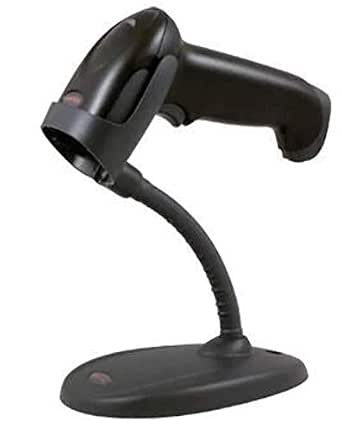 | Best for Simple 1D Checkout Work | Barcode type: Linear 1D | Scanner type: Single-line handheld laser | Connectivity: USB cable | VIEW LATEST PRICE | See Our Full Breakdown |
| Symcode Wireless 1D Barcode Scanner |  | Best for High-Volume Offline Stock Counts | Model: MJ-2030 | Barcode type: 1D laser | Connectivity: 2.4 GHz wireless and USB 2.0 | VIEW LATEST PRICE | See Our Full Breakdown |
| NetumScan NS7060 Omnidirectional Desktop Barcode Scanner |  | Best for Damaged Labels at a Fixed Station | Model: NS7060 | Sensor: 1280 × 800 CMOS, 1MP | Connectivity: USB | VIEW LATEST PRICE | See Our Full Breakdown |
| Tera HW0009 Wireless Barcode Scanner with Screen and Charging Cradle |  | Best for Flexible Retail Workflows | Barcode types: 1D and 2D, including QR code, Data Matrix, PDF417, and UPC/EAN | Connectivity: Bluetooth, 2.4G wireless, USB wired | Battery: 2500mAh lithium-ion | VIEW LATEST PRICE | See Our Full Breakdown |
| Eyoyo EY-037 Industrial 2D QR Barcode Scanner with Wireless Charging Stand |  | Best for Rugged Stockrooms | Barcode formats: 1D, 2D, QR | Connectivity: 2.4 GHz wireless, Bluetooth, USB cable | Ingress protection: IP65 | VIEW LATEST PRICE | See Our Full Breakdown |
| Honeywell Voyager XP 1470g Corded 1D/2D Barcode Scanner, USB Kit, Black |  | Best for Fixed Inventory Stations | Model: Voyager XP 1470g | Barcode types: 1D, 2D, PDF417, QR | Connectivity: USB cable | VIEW LATEST PRICE | See Our Full Breakdown |
| ScanAvenger Wireless 1D and 2D Barcode Scanner with Charging Stand |  | Best for Shared Workstations | Model: SA9000_FBA | Connectivity: Bluetooth, USB cable, wireless | Barcode types: 1D and 2D, including UPC, EAN, Code128, PDF417, Data Matrix, and QR Code | VIEW LATEST PRICE | See Our Full Breakdown |
| Tera Wireless 1D Laser Barcode Scanner with Battery Level Indicator (2-in-1 2.4GHz Wireless & USB Wired) |  | Best for 1D Label Counts | Model: 5100 | Barcode types: Common 1D barcodes | Connectivity: 2.4GHz wireless, USB cable | VIEW LATEST PRICE | See Our Full Breakdown |
| barcode scanners for retail inventory | Connectivity | Dimensions | Model |
|---|---|---|---|
| NetumScan Desktop Barcode Scan | — | 4.13 × 3.7 × 5.45 inches | — |
| Inateck BCST-21 1D Wireless Ba | 2.4G wireless, Bluetooth, USB cable | 3.58 × 2.69 × 6.5 inches | BCST-21 |
| Zebra CS6080 Handheld Companio | USB cable | 0.9 × 1.8 × 4.3 inches | — |
| Honeywell Voyager XP 1472g Wir | Bluetooth 4.2, USB cable | 5 × 3 × 4 inches | Voyager XP 1472g |
| WoneNice WN3300 Wired USB Lase | USB | 2.6 × 3.6 × 6.1 inches | WN3300 |
| Inateck 1D Bluetooth Barcode S | Bluetooth and USB cable | — | — |
| Barcode Scanner with Stand | USB cable | 7 × 4.5 × 3.3 inches | AT003 |
| Honeywell Voyager 1250G Single | USB cable | — | — |
| Symcode Wireless 1D Barcode Sc | 2.4 GHz wireless and USB 2.0 | — | MJ-2030 |
| NetumScan NS7060 Omnidirection | USB | — | NS7060 |
| Tera HW0009 Wireless Barcode S | Bluetooth, 2.4G wireless, USB wired | 3.5 × 4.7 × 7.4 in (D × W × H) | — |
| Eyoyo EY-037 Industrial 2D QR | 2.4 GHz wireless, Bluetooth, USB cable | — | — |
| Honeywell Voyager XP 1470g Cor | USB cable | 8.11 × 1.06 × 3.07 in (D × W × H) | Voyager XP 1470g |
| ScanAvenger Wireless 1D and 2D | Bluetooth, USB cable, wireless | 5.5 × 4.3 × 6.5 in (D × W × H) | SA9000_FBA |
| Tera Wireless 1D Laser Barcode | 2.4GHz wireless, USB cable | 2.5 × 3.9 × 6.6 in (D × W × H) | 5100 |
More Details on Our Top Picks
NetumScan Desktop Barcode Scanner
For a fixed checkout or receiving station, the NetumScan Desktop Barcode Scanner keeps both hands free: its omnidirectional automatic sensing reads supported 1D, 2D, and QR codes without aiming each item at a handheld window. That can speed repetitive inventory entry, especially when staff are handling products or paperwork at the same time. Unlike the WoneNice WN3300, which must be picked up and pointed at each label, this model is designed to sit on a counter. It also reads codes from digital screens and has dust protection and stated drop resistance. The tradeoff is a stationary, USB-tethered setup, and the supplied data explicitly lists Square, Clover, and Shopify as incompatible. I’d choose it only after confirming the scanner works with the store’s POS software.
Pros:- Hands-free automatic sensing supports faster repetitive counter scanning.
- Reads 1D, 2D, and QR codes, including codes on digital screens.
- Plug-and-play USB setup works with Windows, Mac, and Linux.
- IP54 dust protection and stated 4.92-foot drop resistance suit routine retail handling.
Cons:- The supplied compatibility information excludes Square, Clover, and Shopify.
- USB connection keeps the scanner tethered to its station.
- Its desktop form is less practical for aisle counts and mobile stock checks.
Best for: Retail teams with a fixed USB-connected checkout or inventory station that need hands-free scanning and have confirmed POS compatibility.
Not ideal for: Stores using Square, Clover, or Shopify, or staff who need to scan stock across shelves without returning to a wired counter.
- Connection:USB cable
- Power:USB, 5V
- Barcode support:1D, 2D, and QR codes
- Angle of view:180 degrees
- Dimensions:4.13 × 3.7 × 5.45 inches
- Compatibility:Windows XP/7/8/10, Mac OS, Linux
- Listed incompatibility:Square, Clover, Shopify
- Drop resistance:4.92 feet
Our verdict“Choose this for a compatible, fixed retail station where hands-free scanning matters more than mobility.”
Inateck BCST-21 1D Wireless Barcode Scanner
The Inateck BCST-21 is the more practical choice for stock counts that take employees away from the checkout: it connects by 2.4G wireless, Bluetooth, or USB, and supports computers, phones, and tablets. Its 1D-only limit is the defining compromise. Unlike the Honeywell Voyager XP 1472g, it is not presented as a 2D scanner, so stores that scan QR codes or other 2D formats should look elsewhere. For ordinary 1D retail labels, however, the stated ability to read blurry, dirty, wrinkled, and distorted codes can reduce rescans during receiving and shelf audits. The 2000mAh battery is rated for up to three months under normal use, but the listing drops that estimate to about one month with high-frequency use. I’d favor it for flexible 1D work, not mixed-code inventory.
Pros:- Three connection modes support mobile use as well as wired operation.
- Works with Windows, Mac OS, iOS, Android, iPad OS, and Linux.
- Reads common 1D codes described as damaged, dirty, wrinkled, or distorted.
- 2000mAh battery is rated for up to three months under normal use.
Cons:- Reads 1D barcodes only, unlike the 2D-capable Honeywell Voyager XP 1472g.
- Listed battery life falls to about one month under high-frequency use.
- Wireless stock work depends on keeping the scanner charged.
Best for: Small retail teams doing mobile shelf counts or receiving with common 1D product labels and a mix of computers and mobile devices.
Not ideal for: Retailers whose inventory workflows require QR codes or other 2D barcodes, or teams scanning heavily enough to need more frequent charging.
- Model:BCST-21
- Barcode type:1D
- Connectivity:2.4G wireless, Bluetooth, USB cable
- Battery capacity:2000mAh
- Battery life:Up to 3 months under normal use; up to 1 month under high-frequency use
- Compatible operating systems:Windows, Mac OS, iOS, Android, iPad OS, Linux
- Dimensions:3.58 × 2.69 × 6.5 inches
- Weight:6.2 ounces
- Warranty:2 years
Our verdict“Pick the BCST-21 for mobile inventory work built around 1D labels, but choose a 2D model if your store scans QR codes.”
Zebra CS6080 Handheld Companion Barcode Scanner 1D/2D
The Zebra CS6080 suits a retail counter where connection reliability and easy cleaning matter more than cordless movement. Its USB-wired setup avoids wireless interruptions and battery upkeep, while PRZM Intelligent Imaging is described as handling damaged or low-contrast codes. A dust- and water-resistant build with a seamless surface also makes routine cleaning simpler. Compared with the cordless Honeywell Voyager XP 1472g, the Zebra gives up roaming freedom; that is a worthwhile exchange only if scanning stays close to a POS or kiosk. The supplied description calls it handheld, but its USB cable still limits where staff can work, and the specs do not provide an explicit IP rating or drop-height figure. I’d shortlist it for a fixed, high-use station rather than aisle-by-aisle counts.
Pros:- Supports 1D and 2D scanning for mixed barcode workflows.
- USB connection avoids wireless interference and routine battery charging.
- PRZM Intelligent Imaging is described as reading damaged and low-contrast codes.
- Seamless, dust- and water-resistant design supports easier cleaning.
Cons:- USB cable limits range compared with the cordless Honeywell Voyager XP 1472g.
- Not suited to mobile aisle counts or receiving work away from the host device.
- The supplied specs do not state an IP rating or a specific drop-resistance height.
Best for: Retailers seeking a wired 1D/2D scanner for a busy POS or self-service kiosk, especially where wipe-down cleaning is part of daily operations.
Not ideal for: Employees who need to scan across sales floors or stockrooms, since the wired connection restricts movement.
- Barcode support:1D and 2D
- Connectivity:USB cable
- Compatible devices:POS systems, self-service kiosks, USB-enabled devices
- Scanning technology:PRZM Intelligent Imaging
- Scan rate:866.7 megabits per second
- Dimensions:0.9 × 1.8 × 4.3 inches
- Maximum storage temperature:158°F
- Warranty:3 years
Our verdict“Choose the CS6080 for a dependable, cleanable wired POS station, not for inventory work that moves around the store.”
Honeywell Voyager XP 1472g Wireless 2D Barcode Scanner
For inventory teams that move between the sales floor, stockroom, and checkout, the Honeywell Voyager XP 1472g combines cordless scanning with 1D and 2D support. Its listed battery capacity and rating—up to 28 hours or 100,000 scans per charge—make it better suited to extended shifts than a stationary USB model such as the Zebra CS6080. The ruggedness details are unusually specific: the scanner is rated for drops and tumbles and carries an IP52 rating, which helps when equipment changes hands throughout the day. It also reads printed and digital codes, including damaged or poor-quality examples. The main caveat is setup: the listing says a specific Honeywell base is needed for maximum range, and continuous operation may call for spare batteries. I’d prioritize it for mobile work, not a counter that never needs to move.
Pros:- Wireless Bluetooth 4.2 operation supports movement away from a counter.
- Reads 1D and 2D printed or digital barcodes, including damaged and low-quality codes.
- Rated for up to 28 hours or 100,000 scans per charge.
- IP52 rating and stated drop and tumble resistance suit frequent handling.
Cons:- Maximum range requires a specific Honeywell base.
- Long shifts or continuous use may require spare batteries.
- Costs the convenience of wireless freedom without benefit at a strictly fixed station.
Best for: Retail inventory teams that scan across stockrooms and sales floors and need 2D support, long cordless shifts, and a rugged housing.
Not ideal for: Fixed checkout stations that gain little from wireless mobility, or stores unwilling to use the specified Honeywell base for maximum range.
- Model:Voyager XP 1472g
- Connectivity:Bluetooth 4.2, USB cable
- Battery:2400mAh lithium-ion
- Battery life:Up to 28 hours or 100,000 scans
- Durability:30 drops from 1.8m; 1,000 tumbles from 0.5m; IP52 rated
- Dimensions:5 × 3 × 4 inches
- Weight:7.36 ounces
- Color:Black
Our verdict“Choose the Voyager XP 1472g when staff need a rugged 2D scanner they can carry through a full inventory shift.”
WoneNice WN3300 Wired USB Laser Barcode Scanner
The WoneNice WN3300 is a straightforward wired choice for shops that scan conventional product labels at a fixed workstation. Its USB connection and compatibility with Windows, Mac, and Linux keep setup simple, while configurable prefix, suffix, and beep options let staff tailor how scans enter inventory software or spreadsheets. The stated 200 scans per second supports quick label-by-label work, but this is a visible-laser scanner, not the flexible 1D/2D imaging approach offered by the NetumScan desktop model or the Zebra CS6080. That makes it a narrower fit for stores handling QR codes or digital barcodes. Its six-foot cable also limits roaming, and the listed one-year warranty is shorter than the Inateck BCST-21’s two years. I’d choose it for basic, stationary 1D inventory entry—not mixed-code or mobile workflows.
Pros:- Plug-and-play USB setup works with Windows, Mac, and Linux.
- Configurable prefix, suffix, and beep settings can fit existing inventory workflows.
- Listed scan rate is 200 scans per second.
- Two-metre cable and stated 1.5-metre drop resistance support routine workstation use.
Cons:- Wired connection restricts use away from the host computer.
- Visible laser format is less suited than 2D imaging scanners to mixed or digital-code workflows.
- One-year warranty is shorter than the Inateck BCST-21’s stated two-year warranty.
Best for: Small retailers entering standard 1D product labels at a USB-connected computer, including teams that want configurable scan output.
Not ideal for: Stores that scan QR or other 2D codes, need cordless stock counts, or want a scanner designed for digital-screen barcodes.
- Model:WN3300
- Connectivity:USB
- Scan rate:200 scans per second
- Light source:Visible laser, 650–670 nm
- Cable length:2m (6ft)
- Compatible operating systems:Windows, Mac, Linux
- Drop resistance:1.5m onto concrete
- Dimensions:2.6 × 3.6 × 6.1 inches
- Warranty:1 year
Our verdict“Pick the WN3300 for simple, fixed 1D label entry; choose a 2D or wireless model for broader retail inventory work.”
Inateck 1D Bluetooth Barcode Scanner, 2600mAh Battery, 115FT Range, BCST-70
For retail teams that scan 1D barcodes away from the checkout counter, the BCST-70 combines Bluetooth mobility with a case designed to withstand drops from up to 6 feet. Its claimed range of more than 115 feet gives staff room to move around a stockroom without staying tethered to a workstation, while the long standby claim can reduce charging interruptions between inventory sessions. Compared with the Symcode MJ-2030, it offers a more compactly stated wireless range but does not list the same 100,000-code offline storage capacity. Its editable prefix and suffix settings can help adapt scans to a receiving or inventory workflow. The main limitation is its 1D-only scanning: stores handling QR codes or other 2D labels should choose a different model, such as the Anyeast AT003.
Pros:- Bluetooth connection supports mobile stock counts without a USB tether.
- Designed to withstand drops from up to 6 feet onto concrete.
- Editable prefix and suffix settings can match scans to specific inventory workflows.
- Claims up to 115 feet of connection range and 180 days of standby after a full charge.
Cons:- Reads 1D barcodes only, unlike the 1D/2D Anyeast AT003.
- The provided product information does not specify offline barcode storage.
- POS compatibility should be checked for the store’s exact software and setup.
Best for: Retail stockroom teams using 1D product labels who need a drop-resistant Bluetooth scanner for moving between shelves and a computer.
Not ideal for: Stores that scan QR codes, need large offline scan storage, or rely on a POS system whose compatibility has not been confirmed.
- Barcode types:1D
- Connectivity:Bluetooth and USB cable
- Wireless range:More than 115 feet
- Battery capacity:2600 mAh
- Standby claim:Up to 180 days after a full charge
- Drop resistance:Up to 6 feet (1.8 m)
- Compatible systems:POS, iOS, Android, Windows, macOS, Linux, and Raspberry Pi
- Special functions:Editable prefix or suffix up to 32 digits; can hide part of a barcode
Our verdict“Choose the BCST-70 for mobile, 1D stocktaking where drop resistance and Bluetooth range matter more than 2D support or built-in offline storage.”
Barcode Scanner with Stand, USB Wired Inventory 2D/1D Code Scanner
The Anyeast AT003 suits a receiving desk or checkout-side station where hands-free scanning and 2D support are more useful than wireless movement. Its adjustable stand and auto-sensing mode let staff pass items beneath the scanner, while trigger and continuous modes offer alternatives for different tasks. That makes it more flexible for mixed inventory labels than the Honeywell Voyager 1250G, which reads 1D codes only. The tradeoff is a USB cable: staff cannot take the AT003 around the stockroom for shelf counts as they can with the wireless Inateck BCST-70. The product information also flags incompatibility with Square POS, a hard stop for stores using that system. For a fixed Windows, macOS, Linux, or Android setup, its no-driver plug-and-play design keeps deployment straightforward.
Pros:- Reads both 1D and 2D barcodes, including formats the Honeywell Voyager 1250G cannot scan.
- Adjustable stand supports hands-free scanning at a fixed station.
- Trigger, auto-sensing, and continuous modes suit different scanning routines.
- USB plug-and-play setup works with listed systems without driver installation.
Cons:- Wired USB connection limits movement around shelves and stockrooms.
- Not compatible with Square POS systems.
- The listed compatible-device information does not explicitly name macOS, despite the product description stating macOS support.
Best for: Retailers setting up a fixed receiving or checkout station on Windows, macOS, Linux, or Android who want hands-free 1D and 2D scanning.
Not ideal for: Square POS users and staff who need to carry a scanner through aisles for mobile inventory counts.
- Barcode types:1D and 2D
- Scanning modes:Key trigger, auto-sensing, and continuous
- Connectivity:USB cable
- Operating voltage:5 volts
- Compatible systems:Windows, macOS, Linux, and Android, as stated in the product description
- Model:AT003
- Dimensions:7 × 4.5 × 3.3 inches
- Field of view:70 degrees
Our verdict“Pick the AT003 for a stationary retail station that needs hands-free 2D scanning, provided the store does not use Square POS.”
Honeywell Voyager 1250G Single-Line Hand-Held USB Laser Barcode Scanner
The Voyager 1250G is a straightforward fit for a retail counter that scans conventional linear 1D product barcodes and needs a corded handheld device. Its CodeGate function helps prevent an unintended scan from reaching the host: staff can position the scanner first, then press the button to transmit. That extra control distinguishes it from the Anyeast AT003, which offers hands-free auto-sensing and 2D decoding but not the same stated CodeGate feature. The Honeywell’s 17.6-inch scan range and stated 1.5-meter drop resistance suit routine counter work, while remote management support may help stores overseeing multiple devices. Its key compromise is limited format coverage: unlike the AT003, it cannot read 2D codes. It is also USB-only, so aisle-by-aisle stock counts call for a wireless alternative such as the Inateck BCST-70.
Pros:- CodeGate helps prevent accidental data transmission before the operator is ready.
- Scan range is listed at up to 17.6 inches.
- Designed to withstand 30 drops from 1.5 meters.
- Supports remote device management through Honeywell Remote MasterMind software.
Cons:- Scans linear 1D barcodes only, unlike the Anyeast AT003.
- USB cable restricts movement for stock counts away from the counter.
- A fixed-position stand may need to be purchased separately.
Best for: Retail counters with a Windows or desktop-based setup that scan standard 1D labels and want deliberate, button-controlled data transmission.
Not ideal for: Retailers that use QR or other 2D labels, need wireless inventory walks, or require a stand that is confirmed in the package.
- Barcode type:Linear 1D
- Scanner type:Single-line handheld laser
- Connectivity:USB cable
- Scan range:Up to 17.6 inches
- Laser class:Class II
- Drop resistance:30 drops from up to 1.5 m (5 ft)
- Weight:133 g (4.7 oz)
- Compatible devices:Desktop and laptop
Our verdict“Choose the Voyager 1250G for controlled, corded 1D scanning at a retail counter, but skip it if your inventory includes 2D codes.”
Symcode Wireless 1D Barcode Scanner
The Symcode MJ-2030 is the strongest match here for inventory work that may lose its connection to the host: its offline storage holds up to 100,000 barcodes, so staff can collect scans first and upload later. It also offers 2.4 GHz wireless and USB connections, plus support for multiple scanners on one receiver—useful when several workers are counting separate sections. Compared with the Inateck BCST-70, the Symcode lists much larger offline capacity, while the Inateck specifies a 6-foot drop rating and customizable barcode prefixes and suffixes. The Symcode’s stated wireless range is extensive, though the 400-meter figure applies to open air and indoor performance is listed separately. Its serious limitation is POS incompatibility with Square, Shopify, and Clover; those retailers should look at another scanner rather than assume a workaround.
Pros:- Stores up to 100,000 barcodes for offline inventory collection.
- Offers both 2.4 GHz wireless and USB connectivity.
- Supports multiple scanners connected to one receiver.
- Rechargeable 2,000 mAh battery supports extended scanning sessions.
Cons:- Not compatible with Square, Shopify, or Clover POS software.
- Reads 1D laser barcodes only.
- The advertised 400-meter wireless range is for open air; indoor range is listed as up to 100 meters.
Best for: Retail inventory teams using a compatible system that need to collect large batches of 1D scans in areas with unreliable host connectivity.
Not ideal for: Retailers running Square, Shopify, or Clover, or teams that need to scan 2D labels.
- Model:MJ-2030
- Barcode type:1D laser
- Connectivity:2.4 GHz wireless and USB 2.0
- Wireless range:Up to 400 m open air; up to 100 m indoors
- Battery:Rechargeable 2,000 mAh lithium-ion
- Offline storage:Up to 100,000 barcodes
- Compatible devices:Desktop, laptop, smartphone, and tablet
- POS compatibility:Not compatible with Square, Shopify, or Clover
Our verdict“Choose the MJ-2030 for large offline 1D stock counts on a compatible POS, but avoid it if your store uses Square, Shopify, or Clover.”
NetumScan NS7060 Omnidirectional Desktop Barcode Scanner
At a fixed receiving or checkout point, the NS7060 prioritizes image-based reading and hands-free operation. Its 1MP CMOS sensor and wide-angle design are intended to help with small or damaged barcodes, reducing the need to repeatedly reposition awkward items. The adjustable head, lighting, and volume let a retailer tune the station to its counter and work environment. Compared with the Honeywell Voyager 1250G, the NetumScan is a desktop, hands-free option rather than a handheld 1D laser scanner; the supplied information does not specify its supported barcode formats, so buyers should confirm that it reads the labels in their inventory. Its IP54 dust rating and shock resistance add protection for busier work areas. The tradeoff is a USB-only connection, with no wireless option listed for mobile shelf counts.
Pros:- 1MP CMOS sensor and wide-angle design are intended to read small or damaged barcodes.
- Hands-free operation and adjustable scanning head suit a fixed retail station.
- IP54 dust protection and shock resistance up to 4.92 feet support demanding work areas.
- Plug-and-play USB compatibility is listed for Windows, Mac, and Linux.
Cons:- No wireless connectivity option is listed.
- The supplied product data does not specify supported barcode formats.
- A fixed desktop design is less suited to scanning inventory across aisles.
Best for: Retail receiving teams with a fixed computer station that handle small or damaged labels and want hands-free scanning with adjustable settings.
Not ideal for: Staff doing mobile aisle counts, or buyers who need confirmed 1D/2D format support before choosing a scanner.
- Model:NS7060
- Sensor:1280 × 800 CMOS, 1MP
- Connectivity:USB
- Compatibility:Windows, Mac, and Linux
- Durability:IP54 rated; shock-resistant up to 4.92 feet
- Operation:Hands-free
- Adjustable features:Lighting, volume, and scanning head
Our verdict“Choose the NS7060 for a USB-connected retail station where damaged labels and hands-free scanning matter, after confirming its barcode-format compatibility.”
Tera HW0009 Wireless Barcode Scanner with Screen and Charging Cradle
The Tera HW0009 is a strong fit for stores that switch between receiving, shelf checks, and counter work. Its screen lets staff adjust settings and view stored barcodes on the scanner, while Bluetooth, 2.4G wireless, and USB offer more connection choices than the USB-only Honeywell Voyager XP 1470g. The cradle also keeps the scanner charging and houses the 2.4G receiver, which can simplify a shared workstation.
That flexibility comes with more setup choices to manage, and the stated wireless range can shrink around shelves, walls, and other obstacles. Its 1D and 2D support suits mixed inventory labels, but a corded setup may be more predictable for a fixed station. I’d choose it for teams that value an adaptable scanner and built-in controls over a simpler plug-in routine.
Pros:- Reads 1D and 2D formats, including QR code, Data Matrix, PDF417, and UPC/EAN.
- Supports Bluetooth, 2.4G wireless, and USB wired connections.
- On-device screen supports setting changes and barcode storage display.
- Charging cradle includes a built-in 2.4G receiver.
Cons:- Wireless range can fall substantially when obstacles interfere with the signal.
- More connection and setting options may take extra setup compared with a basic USB scanner.
Best for: Retail teams that move between stockroom and sales-floor inventory tasks and want wireless, wired, and Bluetooth options with on-device settings.
Not ideal for: Stores that need a fixed, low-setup USB scanner or depend on consistent wireless coverage across obstructed stockrooms.
- Barcode types:1D and 2D, including QR code, Data Matrix, PDF417, and UPC/EAN
- Connectivity:Bluetooth, 2.4G wireless, USB wired
- Battery:2500mAh lithium-ion
- Wireless range:Up to 328 ft unobstructed; 114 ft with obstacles using 2.4G
- Compatible devices:Desktop, laptop, smartphone, tablet
- Compatible operating systems:Windows, macOS, iOS, Android, Linux
- Dimensions:3.5 × 4.7 × 7.4 in (D × W × H)
- Included:Scanner, charging cradle, charging cable, user manual
Our verdict“Choose the Tera HW0009 if your inventory work spans several devices and locations and you want connection flexibility plus on-scanner controls.”
Eyoyo EY-037 Industrial 2D QR Barcode Scanner with Wireless Charging Stand
For a stockroom where scanners face dust, spills, and frequent drops, the Eyoyo EY-037 puts physical durability ahead of simple setup. Its IP65 protection and stated drop and tumble ratings make it better suited to rough handling than the more workflow-focused Tera HW0009. It also supports handheld and hands-free scanning, with offline storage for up to 100,000 barcodes—a useful buffer when staff work beyond the wireless connection.
The tradeoff is a more involved operating setup: the product information advises reading the manual, and the battery type is listed as nonstandard. Its several scan modes offer flexibility, but may be more than a small shop needs. I’d favor it over the Honeywell Voyager XP 1470g when cordless inventory collection and rugged protection matter more than a straightforward USB connection.
Pros:- IP65-rated dust and water resistance.
- Rated for drops up to 3 m and 7,000 tumbles from 1 m.
- Stores up to 100,000 barcodes for offline collection.
- Offers 2.4 GHz wireless, Bluetooth, USB, and multiple scan modes.
Cons:- The range of modes and settings may require time with the user manual.
- Battery type is listed as nonstandard, which may complicate replacement planning.
Best for: Retail stockroom and receiving teams that need a rugged cordless scanner, offline barcode storage, and hands-free scanning options.
Not ideal for: Small shops seeking a simple plug-and-play checkout or inventory scanner without multiple modes or setup steps.
- Barcode formats:1D, 2D, QR
- Connectivity:2.4 GHz wireless, Bluetooth, USB cable
- Ingress protection:IP65
- Storage capacity:Up to 100,000 barcodes
- Scanning modes:Manual trigger, continuous, auto-sensing
- Compatible devices:Desktop, laptop, POS, smartphone, tablet
- Compatible operating systems:Windows, macOS, iOS, Android, Linux
Our verdict“Pick the Eyoyo EY-037 for demanding stockroom work where rugged protection and offline batch capture outweigh quick, simple setup.”
Honeywell Voyager XP 1470g Corded 1D/2D Barcode Scanner, USB Kit, Black
The Honeywell Voyager XP 1470g suits a fixed receiving desk or inventory terminal where a dependable USB connection matters more than moving freely around the store. Its automatic USB setup keeps the connection routine simple, and its ability to read damaged or poorly printed codes can save time when labels have seen wear. It also reads codes on mobile screens, a capability that can help with digital inventory lists or returns.
Unlike the cordless Tera HW0009 or Eyoyo EY-037, this Honeywell ties the user to its cable, so it is less suited to aisle counts or cart-side scanning. In return, there is no wireless link to manage or battery to charge. Its drop and tumble ratings add resilience, though this remains a fixed-workstation choice rather than a mobile inventory tool.
Pros:- Reads damaged and poorly printed 1D and 2D barcodes.
- Scans codes displayed on smartphone and tablet screens.
- USB plug-and-play setup with automatic configuration.
- Drop and tumble resistance suits busy retail work areas.
Cons:- The cord limits mobility for aisle and stockroom inventory work.
- No cordless connection or battery-powered operation is provided.
Best for: Retailers with a fixed receiving, returns, or inventory station that scans worn labels and wants a USB setup without battery management.
Not ideal for: Staff doing aisle counts, cart checks, or stockroom rounds who need to carry a scanner away from a workstation.
- Model:Voyager XP 1470g
- Barcode types:1D, 2D, PDF417, QR
- Connectivity:USB cable
- Power source:Corded electric
- Compatible devices:Desktop, laptop, smartphone, tablet
- Dimensions:8.11 × 1.06 × 3.07 in (D × W × H)
- Drop resistance:30 drops from 6 ft (1.8 m)
- Tumble resistance:1,000 tumbles from 1.6 ft (0.5 m)
Our verdict“Choose the Voyager XP 1470g for a fixed retail station where USB simplicity and difficult-label reading matter more than mobility.”
ScanAvenger Wireless 1D and 2D Barcode Scanner with Charging Stand
The ScanAvenger SA9000_FBA is geared toward a shared retail station where a scanner needs to alternate between handheld use and resting in its stand. It reads a broad mix of 1D and 2D formats and offers Bluetooth, stand-based wireless, and USB, giving it more connection flexibility than the corded Honeywell Voyager XP 1470g. Vibration alerts are a practical touch when a busy shop floor makes beeps easy to miss, and auto-sense mode can reduce repeated trigger presses at a stationary counter.
Its limits matter for POS planning: it does not scan Maxicode and may not work with systems that require proprietary hardware or direct app integration. Compared with the Tera HW0009, it has no described on-device screen for changing settings or viewing stored codes. I’d shortlist it for compatible systems that benefit from a charging stand and hands-free scanning.
Pros:- Reads a wide range of 1D and 2D formats, including PDF417, Data Matrix, and QR.
- Offers Bluetooth, wireless transmission through the stand, and USB.
- Charging stand stores and charges the scanner.
- Vibration alerts and auto-sense mode support busy or noisy work areas.
Cons:- Does not scan Maxicode.
- May not work with POS systems requiring proprietary hardware or direct app integration.
- Compatibility should be checked before relying on it with a specific retail system.
Best for: Retail teams with compatible POS or computer systems that share a scanner between counter use and hands-free scanning.
Not ideal for: Businesses using Maxicode labels or POS software that requires proprietary hardware or direct app integration.
- Model:SA9000_FBA
- Connectivity:Bluetooth, USB cable, wireless
- Barcode types:1D and 2D, including UPC, EAN, Code128, PDF417, Data Matrix, and QR Code
- Supported devices:Desktop, laptop, POS, smartphone, tablet
- Battery:One included lithium-ion battery
- Scan modes:Manual and auto-sense
- Dimensions:5.5 × 4.3 × 6.5 in (D × W × H)
- Weight:1.1 lb
Our verdict“Choose the ScanAvenger for a compatible shared workstation that benefits from a charging stand, auto-sensing, and vibration alerts.”
Tera Wireless 1D Laser Barcode Scanner with Battery Level Indicator (2-in-1 2.4GHz Wireless & USB Wired)
The Tera 5100 is a focused choice for stores whose inventory labels are primarily 1D barcodes. Its 2.4GHz wireless and USB options allow it to move between aisle counts and a fixed computer, while the battery indicator helps staff spot a low charge before starting a shift. The silicone anti-shock cover and IP54 dust protection also make it more suited to everyday stockroom handling than a basic wired scanner such as the Honeywell Voyager XP 1470g.
This model reads common 1D codes, including damaged, fuzzy, reflective, or smudged labels, but it does not offer the stated 2D coverage of the Tera HW0009 or ScanAvenger. The listed 300-second scan rate is a concern for high-volume work, so I would not choose it for rapid continuous processing. Its best fit is routine 1D inventory capture where portability and battery visibility matter more than 2D versatility.
Pros:- Reads common 1D labels, including damaged, fuzzy, reflective, and smudged codes.
- Supports 2.4GHz wireless operation and USB wired use.
- Battery level indicator helps staff plan charging.
- Anti-shock silicone cover and IP54 dust protection suit stockroom handling.
Cons:- The listed scan rate of 300 seconds may not suit high-volume scanning.
- The product data describes 1D scanning rather than the 2D support offered by several alternatives.
- The stated 328 ft wireless range is barrier-free, so obstacles may reduce practical coverage.
Best for: Small retail teams performing routine 1D shelf counts or stock checks who want cordless operation and a visible battery indicator.
Not ideal for: Stores that scan QR or other 2D labels, or run high-volume inventory sessions where the listed scan rate may be limiting.
- Model:5100
- Barcode types:Common 1D barcodes
- Connectivity:2.4GHz wireless, USB cable
- Battery:One included lithium-polymer battery
- Wireless range:Up to 328 ft barrier-free
- Scan rate:300 seconds (as listed)
- Dimensions:2.5 × 3.9 × 6.6 in (D × W × H)
- Warranty:1 year
Our verdict“Pick the Tera 5100 for ordinary 1D inventory counts when cordless convenience and battery visibility matter more than 2D support or fast throughput.”
How We Picked
I ranked these 15 barcode scanners for retail inventory by how well their stated capabilities suit real store tasks: receiving cartons, counting shelves, checking items at a counter, and moving between aisles and a workstation. I weighed 1D versus 2D support, wired and wireless connection options, handheld versus desktop design, and practical workflow details such as included stands, charging cradles, screens, and battery indicators. I also considered how much complexity each format adds for staff and whether a model’s capabilities make sense for a focused inventory job.
The order favors versatility for mixed retail work without treating every store as if it needs the same scanner. The Zebra CS6080 leads for its adaptable handheld role; the Honeywell Voyager XP 1472g follows for wireless 2D work, while the NetumScan NS7060 earns a strong position for counter-based scanning. Simpler wired and 1D models rank lower for broad use, not because they cannot fit a store, but because their narrower capabilities suit fewer inventory workflows. Product details and compatibility should be checked against the scanner’s listing and the retailer’s POS or inventory software before purchase.
Factors to Consider When Choosing Barcode Scanners For Retail Inventory
Before choosing a scanner, I’d map where each scan happens and what happens immediately after it. A device that reads every code type can still slow a store down if it is awkward to carry, awkward to return to its cradle, or poorly matched to the software receiving the scans. These factors help separate a good product match from a specification that looks useful but adds little to your day-to-day count process.
Match the Scanner Format to the Work Area
Start by counting how often staff scan at a fixed counter versus moving through aisles, back rooms, and receiving areas. A desktop or stand-mounted scanner can keep repetitive counter work hands-free, but it ties scanning to a specific surface and may not suit shelf audits. A handheld model is easier to carry between locations, though workers may need to aim and trigger it for every item. Stores with both workflows may need separate devices rather than one scanner asked to do everything. A common mistake is buying a desktop unit for stock counts because it looks fast at checkout. If staff scan while holding cartons or ladders, prioritize a handheld design and a safe place to store it between scans.
Choose 1D or 2D Based on the Codes You Actually Use
Traditional product UPCs are 1D, while QR codes and many newer labels use 2D formats. If your inventory process scans only familiar linear product codes, a 1D scanner may be a straightforward fit and can avoid paying for capabilities your workflow will not use. Choose 2D support if your store uses QR codes, digital codes on phone screens, or labels that may include more information in a compact space. Do not assume that a scanner’s ability to read a code guarantees your POS or inventory system will accept the data. Check the code formats in use and confirm software compatibility before ordering multiple units. Planning for 2D can make sense when new label formats are already part of your operation, but it is not a substitute for checking the software path.
Balance Wireless Range Against Charging Routines
Wireless scanners can make aisle counts and receiving checks easier by removing the need to stay beside a computer. Their value depends on the distance between staff and the connected device, plus whether scans remain in the scanner or need to reach the system immediately. Compare the stated connection options with the layout of your store, and test the intended pairing method with the target computer or tablet. Battery capacity, charging method, and a battery-level indicator affect whether a scanner is ready at the start of a shift. A charging cradle can help make returning the scanner part of the routine, but it also occupies counter space and needs a consistent location. If the scanner will rarely leave the workstation, a wired model may be simpler to manage.
Check Software, Device, and Data Compatibility
A scanner is only useful for inventory if its scans arrive in the right application and field. Confirm the supported connection type and operating-system compatibility for the devices your staff use, especially if inventory runs on a tablet rather than a desktop computer. Many USB scanners act like keyboard input, but that behavior still needs to fit the software’s active field and data-entry rules. Wireless models can rely on different connection methods, so check whether your setup needs a receiver, Bluetooth pairing, or another supported connection. Review any required prefix, suffix, or formatting settings if the inventory system expects them. Testing one unit with your actual labels and software can reveal workflow issues before a larger purchase.
Plan for Shared Use, Storage, and Upkeep
In a busy store, a scanner often changes hands many times in one shift. A stand or cradle can reduce misplaced devices and make a fixed station easier to use, while a handheld scanner without a designated return spot may wander between departments. Think about who charges wireless models, who checks their condition, and where spare units live. Dust, frequent handling, and accidental drops can also affect the value of a device, so compare the product’s stated construction and intended use with the conditions in your stockroom. Avoid buying a feature-heavy scanner for every station if only a few employees need mobility or 2D reading. Standardizing a smaller set of models can make staff training and replacement easier, provided each station still has the right format.
Spend on Capabilities That Remove a Real Bottleneck
A higher-capability scanner earns its place when it solves a recurring problem, such as reading screen-based codes, scanning away from a workstation, or handling frequent counter traffic without constant repositioning. It may not help a store whose only task is occasional scanning of printed UPCs at one desk. Include the full workflow in your decision: a wireless model may need charging space, and a desktop unit may need a dedicated counter position. Consider how many staff members share the scanner and whether a breakdown would stop a critical receiving or checkout task. Start with the busiest or most demanding station rather than assuming every employee needs the same device. That approach helps direct spending toward the feature that changes the work, rather than toward specifications with little practical effect.
Frequently Asked Questions
Should I choose a 1D or 2D scanner for retail inventory?
Choose based on the labels and codes your store scans today, not on the assumption that every retailer needs the broadest format. A 1D model can suit inventory built around printed UPCs and other linear barcodes. A 2D model makes more sense if your workflow includes QR codes, screen-based codes, or compact labels that use 2D formats. Check that your POS or inventory software can process the code data before choosing a scanner. If you expect a change in label formats, compare the cost and workflow of upgrading later with the value of 2D support now.
Is a wireless scanner worth it for stock counts?
Wireless is most useful when employees scan away from a workstation, such as during aisle counts, receiving, or back-room checks. It reduces the need to stay near a computer, but adds charging, pairing, and storage routines. Check how scans reach your inventory system and whether the connection works across the distances and obstacles in your store. If staff scan at a single fixed counter, a wired model may be easier to keep ready. For a mixed workflow, reserve wireless units for tasks where movement actually saves time.
Can one scanner serve both checkout and inventory work?
Sometimes, but the answer depends on how different those tasks are. A handheld 1D/2D scanner can cover a wider range of labels and locations, while a desktop scanner may be more convenient for repeated counter scanning. If employees need to carry a scanner through the store and then use it hands-free at checkout, check whether its form factor and included stand support both jobs. You should also confirm that both applications accept scans in the same way. Separate devices can be a better fit when checkout volume is high and inventory work happens far from the counter.
What should I verify before connecting a scanner to my POS or inventory system?
Confirm the scanner’s connection method, supported device or operating system, and the code types it reads. Check whether your setup needs a USB cable, wireless receiver, or Bluetooth pairing, and make sure the target computer or tablet supports that connection. Test a scan inside the actual inventory or POS application, since successful pairing alone does not prove the data enters the right field. If your system uses special formatting or data prefixes, check whether the scanner can be configured to match. Trying one unit before standardizing across several stations can help catch compatibility problems early.
Do I need a stand or charging cradle for a retail scanner?
A stand can support hands-free use at a fixed counter, while a charging cradle can also give a wireless scanner a regular charging and storage point. Neither is necessary for every inventory workflow: mobile shelf counts may call for a handheld scanner that staff carry, not a counter stand. Check whether the included accessory fits your intended scanning style rather than assuming every stand performs the same job. A designated return spot can reduce the chance that shared scanners go missing between shifts. Also account for counter space, power access, and who will return the device after use.
Conclusion
For a store that needs one flexible handheld scanner across several inventory tasks, I’d choose the Zebra CS6080 as best overall. The Inateck BCST-21 is my best value-style pick for buyers who want a simpler wireless 1D option, while the Honeywell Voyager XP 1472g is the best premium fit for wireless 2D work. For beginners setting up a straightforward fixed station, I’d start with the WoneNice WN3300 if 1D scanning is enough, or the stand-equipped USB Wired Inventory 2D/1D Code Scanner if hands-free 2D scanning matters. Choose the NetumScan NS7060 for busy counter scanning, the Inateck BCST-70 for wireless 1D mobility, and the Eyoyo EY-037 when a wireless charging stand and 2D reading suit your workflow. Match the scanner to the work location, code formats, and software first; extra capability only helps when staff can use it in their daily process.