
🔍 Read the full analysis: 8 OLED Gaming Monitors For Immersive Action And Fast-Paced Play In 2027 on ThorstenMeyerAI.com
TL;DR
ThorstenMeyerAI.com’s roundup names eight OLED gaming monitors, ranking the ASUS ROG Strix XG27AQDMGR as its overall pick and the Alienware AW3425DW for ultrawide play. The supplied information gives specific details for only some models, so refresh rates and other specifications should be checked against each exact configuration before buying.
ThorstenMeyerAI.com has published its roundup of eight OLED gaming monitors, naming the ASUS ROG Strix XG27AQDMGR its overall choice and the Alienware AW3425DW its pick for curved ultrawide gaming. The guide contrasts compact 27-inch QHD screens with a wider 34-inch display, but its supplied product details do not specify every model’s refresh rate or other buying-critical features.
The source identifies the ASUS ROG Strix XG27AQDMGR as a 27-inch QHD monitor with a stated 240Hz refresh rate, a category also covered in this guide to high-refresh gaming monitors. It says that combination makes the model a versatile fit for players seeking high refresh rates without an ultrawide screen. The Alienware AW3425DW is described as a 34-inch curved ultrawide for players who want more horizontal screen space. The MSI MAG 272QP QD-OLED X24 is another listed 27-inch QHD option.
The roundup’s eight named products are the ASUS ROG Strix XG27AQDMGR, Alienware AW3425DW, MSI MAG 272QP QD-OLED X24, ASUS ROG Strix XG27AQDMG, MSI MAG 271QPX QD-OLED, MSI MPG 271QRX QD-OLED, Samsung Odyssey OLED G6 and Samsung Odyssey OLED G8. The source material does not include full specification sheets or model-by-model assessments for all eight; beyond the descriptions above, it is not possible to verify specific performance distinctions from the supplied information.
According to the guide, several listings state 240Hz, but refresh-rate information is not equally clear across the selection; OLED monitor technology is also discussed in this look at AI-enhanced OLED gaming monitors. It advises buyers to check the exact configuration rather than assume a monitor’s performance from its OLED or QD-OLED label. The source does not establish comparative brightness, port selection, warranty terms or burn-in protections, and does not use those factors to rank the products.
The 8 picks
- 1
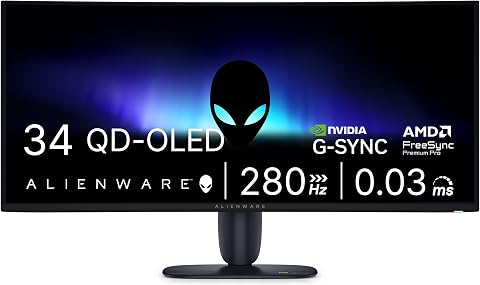 Alienware AW3426DW 34-Inch QD-OLED Gaming MonitorView on Amazon →
- 2
 Alienware 34 AW3425DW 240Hz QD-OLED Curved Gaming MonitorView on Amazon →
- 3
 ASUS ROG Strix XG27AQDMGR 27-Inch QHD 240Hz OLED Gaming MonitorView on Amazon →
- 4
 Acer Predator 26.5-inch QHD 2560×1440 QD-OLED Gaming Monitor X27U W1View on Amazon →
- 5
 MSI MAG 272QP QD-OLED X24 27-Inch WQHD Gaming MonitorView on Amazon →
- 6
 LG UltraGear 27-inch QHD OLED Gaming Monitor, 240HzView on Amazon →
- 7
 Samsung 27-Inch Odyssey OLED G5 QHD Gaming MonitorView on Amazon →
- 8
 AOC Q27GAZDV 27-Inch QHD 240Hz QD-OLED Gaming MonitorView on Amazon →
Choosing Between QHD and Ultrawide
The buying decision described in the roundup is less about a single universal winner than about matching a screen to a desk, game library and PC. A 27-inch, 16:9 QHD monitor is a conventional form factor that can suit competitive play and mixed desktop use. A 34-inch curved ultrawide offers more horizontal space, but requires more room and may not fit every game or video source as intended.
Refresh rate also matters only in relation to the games and hardware being used. The source notes that a 240Hz display is most relevant when a PC can produce enough frames and the player values the smoother motion. Buyers who cannot reach high frame rates may place greater weight on screen shape or resolution. These trade-offs make checking the exact model configuration more useful than relying on broad OLED category labels.
Popular right now

LG 55-Inch QNED73B Mini LED 4K Smart TV (2026)

LG StanbyME 2 Max 32-Inch 4K Portable Smart Touchscreen TV

iRobot Roomba Plus 405 (G181) 2-in-1 Vacuum and Mop Robot with AutoWash Dock
As an affiliate, we earn on qualifying purchases.
What the Roundup Compares
The guide says it compares monitors by their stated resolution and refresh rate, screen size and shape, panel type, and how clearly product listings describe intended use. It favors versatility first, then gives separate roles to models aimed at particular setups. Its top pick reflects the stated 27-inch QHD and 240Hz combination, while the Alienware is singled out for its wider format.
The source also describes common OLED benefits as deep blacks and quick pixel response, while cautioning that those characteristics do not settle questions of resolution, screen format or use case. It advises checking manufacturer care guidance for static desktop elements, such as taskbars and game HUDs, and using any built-in pixel-care features as directed. The provided material does not document the protection features of each named monitor.
„The ASUS ROG Strix XG27AQDMGR is the best overall.“
— ThorstenMeyerAI.com roundup
Specifications Buyers Still Need
The supplied source material does not provide complete, comparable specifications for all eight monitors. It does not establish each model’s native resolution, refresh rate, connectivity, brightness, stand adjustments, warranty terms or burn-in protections. Although the guide says several listings state 240Hz, it does not identify every model with that figure in the material provided here.
It is also unclear whether every named product is available in the same configuration across markets, or what current pricing and stock look like. Buyers should confirm the exact model number and manufacturer listing before treating any missing specification as settled. The roundup is a buying guide, not an announcement of a new product launch or a report of independently measured comparative testing.
Check Exact Models Before Buying
Before choosing, readers should compare the manufacturer’s current listing for the exact monitor configuration, including resolution, supported refresh rate and connection requirements. They should also confirm the screen’s dimensions, mounting and stand fit, warranty coverage and any panel-care guidance. For an ultrawide, check whether frequently played games support the format and whether the desk can accommodate the display.
The source does not give a future product announcement or a date for updated specifications. A final purchase comparison will depend on verified model details and local availability, neither of which is established for all eight products in the provided material.
Key Questions
Which monitor does the roundup rank first?
ThorstenMeyerAI.com names the ASUS ROG Strix XG27AQDMGR its overall pick, citing its stated 27-inch QHD format and 240Hz refresh rate.
Which model is the ultrawide pick?
The source highlights the Alienware AW3425DW for players seeking a 34-inch curved ultrawide screen.
Are all eight monitors confirmed to run at 240Hz?
No. The source says refresh-rate information is not equally specified across the listings. It does not confirm a 240Hz rate for every model.
What should buyers verify before ordering?
Check the exact model’s resolution, refresh rate, connections, dimensions, warranty and panel-care features with its manufacturer or retailer. The supplied roundup does not establish all of those details for every monitor.
Source: ThorstenMeyerAI.com