
🔍 Read the full analysis: Halloween Decorating With AI: Where To Begin on ThorstenMeyerAI.com
TL;DR
There is no single product launch or breaking event behind this topic; this is a practical report on how to start using AI in Halloween decorations. The key distinction is between AI features such as generated content or speech responses and ordinary motion-triggered effects, which may be marketed as smart. Start with one scene, check what runs locally, and plan for safety, privacy, and failures.
People planning AI-themed Halloween decorations should first check what a product actually does, as explained in the original guide: a motion sensor that plays a fixed recording is ordinary automation, while generated content or dialogue that responds to speech uses additional AI capabilities. That distinction affects what a display can do, how much setup it needs, and whether it depends on an internet service, according to guidance from ThorstenMeyerAI.com.
The term AI-powered decor can refer to several different functions. Generative tools can create or help draft images, audio, and character lines. Speech recognition can let a prop respond to spoken phrases, while computer vision can analyze camera images. By comparison, a sensor that plays the same growl each time someone approaches follows a fixed trigger, even if the effect is entertaining.
Those capabilities come with different tradeoffs. Generated material may need editing, and a speech system may mishear visitors in a noisy setting. Camera-based features can raise privacy questions. Online services may provide more flexible responses, but they can depend on a working connection and may transmit information outside the home. A local recording usually offers less variation but can be more dependable.
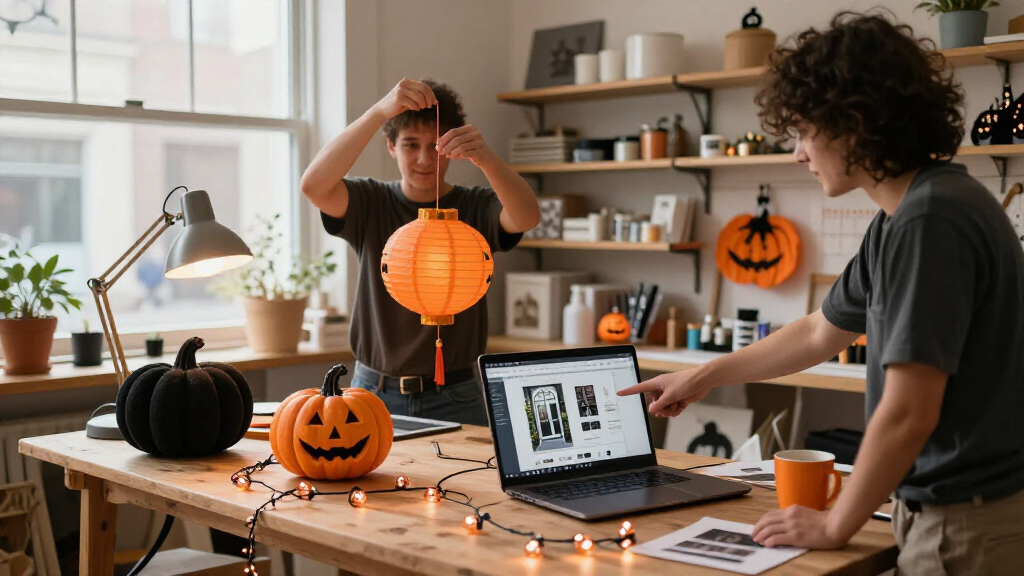
The guide recommends planning around one clear visitor experience, such as a portrait whispering a welcome as guests approach. A light, speaker, and trigger can support that moment, but adding more devices can also create delays, competing cues, and extra troubleshooting. The suggested sequence is to choose the moment, create and review its content, select a trigger and output, then test the scene from a visitor’s position.
A motion-triggered recording is automation; AI usually means a system generates or interprets content.
Use generated art, voices, or dialogue to personalize a scene, then review the results and usage terms.
Plan one clear visitor moment before choosing sensors, lights, speakers, or controllers.
Test offline behavior, sensor timing, audio, cable placement, and outdoor protection before Halloween night.
Tell visitors when a display processes faces or voices, limit collection, and provide a way to pass without interacting.
Choosing Effects That Work on Halloween Night
The practical concern is whether a display works when visitors arrive, not whether its packaging uses the word AI. A short, well-timed cue may be easier to notice than several simultaneous sounds and lights. Each additional connected device can add a point of failure, especially when a scene relies on an online service or home Wi-Fi.
That matters for both modest porch displays and more involved builds. A motion detector and local recording may be enough for a jump scare; a responsive character can support a brief conversation but needs a microphone, speech tools, and testing. Matching the feature to the scene helps decorators make choices about cost, setup, reliability, and guest experience before buying or building.
There are also practical obligations around the material itself. The source advises reviewing generated voices and visuals for tone and checking whether licenses allow commercial use or sharing. Where cameras or microphones are involved, decorators should understand what the device captures and where that data goes. These checks help keep the display appropriate for its audience and its setting.
From Fixed Triggers to Responsive Props
Halloween effects have long used simple triggers: a visitor approaches, a sensor activates, and a prop moves or plays a recording. AI tools add possible ways to create the media in advance or vary a character’s response. The underlying decoration may still combine familiar parts, including a speaker, smart bulb, motion detector, and controller.
The guide’s example is a dim entryway with a portrait that whispers as guests approach. Generated art could give the portrait a candlelit appearance, while a speaker provides its voice and a bulb changes color. If the bulb relies on an internet connection, an outage could interrupt the cue. A local recording or backup light could keep part of the scene working, though it would not provide the same degree of variation.
Product descriptions and capabilities can change. ThorstenMeyerAI.com advises checking current availability, features, pricing, and privacy settings before purchase, including whether a function runs locally or uses an online service. The source material provides practical advice rather than independently verified product comparisons or a dated announcement.
Product Claims and Setup Limits
The source does not identify specific products, suppliers, prices, or a newly released technology, so it does not establish which devices currently offer the described capabilities. It also does not provide independent performance tests. The label AI-powered alone cannot show whether a particular prop generates content, recognizes speech, analyzes images, or simply reacts to a sensor.
Actual performance will depend on the device, the room or yard, ambient noise, network access, and configuration. The guide notes that speech recognition can fail in noise and that online features can lose timing when connectivity drops. It does not quantify how often these problems occur or specify what data particular products collect; those details need to be checked with each manufacturer.
Test the Scene Before Guests Arrive
Before Halloween night, decorators can run the complete scene from the point where a visitor will encounter it. Check whether the trigger activates at the intended distance, whether the sound and light arrive together, and whether the content is audible and appropriate. Test any online feature with the expected network conditions, then try the display with the connection unavailable to learn what still works.
For a build involving lights, speakers, plugs, or hobby electronics, check the equipment instructions and placement for the intended setting. Keep a simpler fallback available when a connected feature is needed for the main effect. As product details may change, review current privacy settings and licensing before using generated or recorded material. The source offers no scheduled industry milestone; the next useful step for a decorator is a small, tested scene built around one clear moment.
Key Questions
Does a motion-triggered Halloween prop count as AI?
A prop that plays the same recording whenever a sensor detects movement is generally ordinary automation. The source distinguishes it from features that generate material, interpret speech, or analyze images.
Where should I begin with an AI Halloween display?
Choose one moment you want visitors to experience, such as a portrait whispering as they approach. Then decide whether generated content, a fixed recording, or a responsive character best serves that scene.
Do AI decorations need an internet connection?
Some features may depend on an online service, while local playback can work without one. Check the product’s requirements: connected features may offer more variation but can be affected by connectivity.
What should I check before using a camera or microphone?
Review what the device captures, whether it processes information locally or sends it to a service, and what its privacy settings allow. The source does not provide details for specific products, so check their current documentation.
Source: ThorstenMeyerAI.com