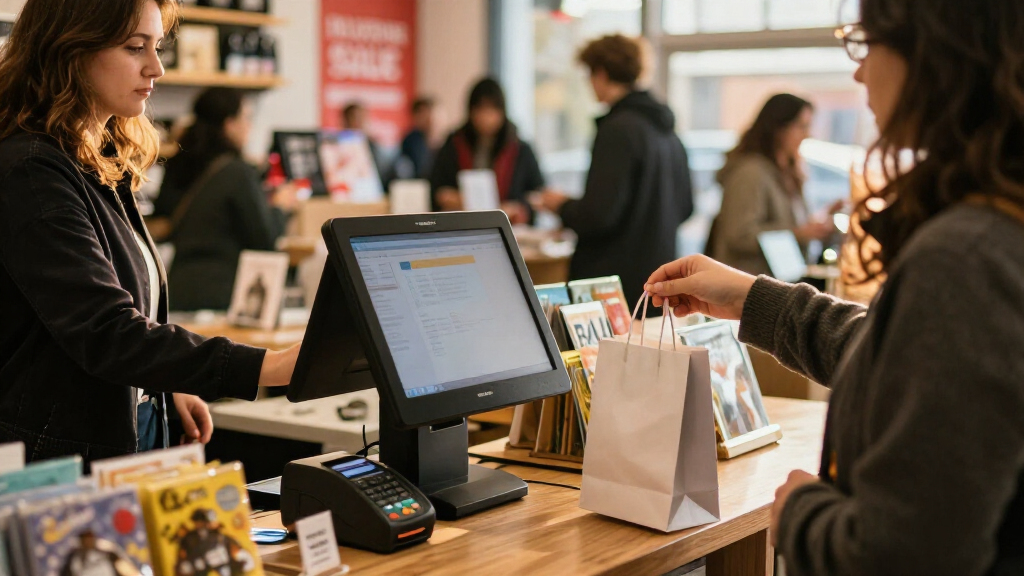

Black Friday POS systems need to keep checkout moving when queues grow, inventory shifts quickly, and staff are under pressure. My best overall pick is the Square Register (2nd Generation) for its purpose-built register format and dual-display setup; the Square Handheld stands out for line-busting, while the Volcora dual-screen terminal suits businesses that want Windows-based hardware. The main tradeoff is between a compact, mobile checkout and a fuller counter station with more connected equipment. I also compare bundled all-in-one systems and tablet-based setups, which can differ in flexibility and setup demands. Read on for the full breakdown and help matching a system to your Black Friday operation.
Key Takeaways
- Square Register (2nd Generation) is my overall pick because its dual-display register layout is better suited to a staffed counter than a handheld reader or bare tablet setup.
- Square Handheld fills a different role from the counter systems: portability can help staff take payments away from the till, but it is not a full replacement for a fixed checkout station.
- The all-in-one terminals in this roundup commonly pair touchscreens with receipt printers, and some add scanners or cash drawers; that bundled setup can reduce separate hardware decisions but makes compatibility checks more important.
- Datio’s tablet-based systems are the flexible route for businesses already committed to an Amazon Fire tablet or compatible iPad, while depending more on the chosen tablet and its fit with the package.
- Two SmartPOS NX2 listings appear in the lineup with very similar names. Buyers should compare the exact included hardware and seller listing details rather than assume the two entries represent distinct configurations.
| SmartPOS NX2 All-in-One POS System for Small Businesses |  | Best for Processor Flexibility | Model: SmartPOS NX2 | Cashier display: 15.6-inch touchscreen | Included hardware: Customer-facing display, cash drawer, barcode scanner, thermal receipt printer | VIEW LATEST PRICE | See Our Full Breakdown |
| M9 Android 11 All-in-One POS System with Dual 15.6-Inch Touchscreens and 58mm Thermal Printer |  | Best Dual-Screen All-in-One | Operating system: Android 11 | Displays: Two 15.6-inch flat touchscreens | Resolution: 1920 x 1080 (Full HD) | VIEW LATEST PRICE | See Our Full Breakdown |
| Datio POS Cash Register System for 10-Inch Amazon Fire Tablet |  | Best Modular Tablet-Based Kit | Compatible device: 10-inch Amazon Fire Tablet | Included components: Register base, thermal receipt printer, cash drawer, stand | Tablet included: No | VIEW LATEST PRICE | See Our Full Breakdown |
| Square Handheld Portable POS and Credit Card Reader |  | Best for Mobile Checkout | Dimensions: 7.04 x 3.12 x 0.62 inches | Weight: 2.11 ounces | Payment methods: Major credit and debit cards | VIEW LATEST PRICE | See Our Full Breakdown |
| SmartPOS-129 Professional All-in-One POS System for Small Businesses |  | Best for a Full-Size Customer Display | Cashier display: 15-inch touchscreen | Customer-facing display: 15 inches | Included components: Cash drawer, thermal printer, handheld 2D barcode scanner | VIEW LATEST PRICE | See Our Full Breakdown |
| Square Register (2nd Generation) Point-of-Sale System |  | Best Overall for Busy Countertops | Brand: Square | Model number: A-SKU-0908 | Weight: 12.6 pounds | VIEW LATEST PRICE | See Our Full Breakdown |
| NORQIN 15.6-Inch Touchscreen All-in-One POS System with Built-In Thermal Printer |  | Best for Windows-Based Small Businesses | Operating system: Windows 10 Pro | Processor: 3rd-generation Intel Core i5 | Memory: 8 GB RAM | VIEW LATEST PRICE | See Our Full Breakdown |
| All-in-One Touchscreen POS Cash Register with Built-In 58mm Printer, Customer Display, Cash Drawer, and Scanner |  | Best Bundled Counter Setup | Main display: 15.6-inch touchscreen, 1366 × 768 | Customer display: 15.6-inch display listed for the dual-screen set | Processor and memory: Dual-core i5; 8 GB DDR3 | VIEW LATEST PRICE | See Our Full Breakdown |
| Mobile POS Terminal, Android 11, Barcode Scanner, 58mm Printer | 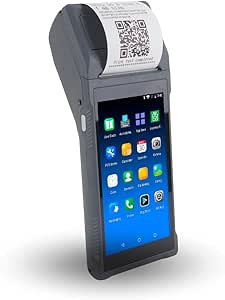 | Best for Mobile Checkout | Screen: 5.5 inches | Operating system: Android 11 | Memory and storage: 2 GB RAM; 16 GB ROM | VIEW LATEST PRICE | See Our Full Breakdown |
| Square Register POS System with Dual Displays and Account Setup Support |  | Best for Guided Square Setup | System: Square Register POS | Display: Dual seller-facing and customer-facing displays | Account requirement: New Square account activated through Advantage POS Store | VIEW LATEST PRICE | See Our Full Breakdown |
| Datio POS System with Cash Drawer and Thermal Receipt Printer for 9.7–10.2-Inch iPads |  | Best for Existing iPad Owners | Compatible devices: Apple iPad, 9.7–10.2 inches | Included components: Cash drawer, iPad stand, thermal printer, cables | Printer type: Thermal; no ink or toner required | VIEW LATEST PRICE | See Our Full Breakdown |
| Volcora Dual-Screen POS Terminal with Windows 11 Professional |  | Best for Dual-Screen Windows Setups | Operating system: Windows 11 Professional | Processor: Intel Core i5 | Memory: 4 GB | VIEW LATEST PRICE | See Our Full Breakdown |
| SmartPOS NX2 All-in-One Point of Sale System for Small Businesses |  | Best Complete Checkout Bundle | Cashier display: 15.6-inch touchscreen | Customer display: 11-inch customer-facing display | Included hardware: Cash drawer, thermal receipt printer, 2D barcode scanner | VIEW LATEST PRICE | See Our Full Breakdown |
More Details on Our Top Picks
SmartPOS NX2 All-in-One POS System for Small Businesses
For a small retailer choosing a Black Friday POS system, the SmartPOS NX2 makes a strong case for reducing setup guesswork: its bundle includes a cashier touchscreen, customer-facing display, cash drawer, barcode scanner, and receipt printer. Support for more than 50 card processor integrations may also help a business keep a preferred payment provider rather than adapting its checkout around a narrower ecosystem. The included setup call and Retail360 app add a path to help with initial configuration and mobile inventory tasks.
Compared with the SmartPOS-129, the NX2 has a smaller stated footprint and lower listed weight, which may suit counters with less room. The tradeoff is that it is still a substantial 46.8-pound package, and the description does not specify its operating system or printer details. I’d shortlist it for shops that value bundled hardware and processor choice, not buyers seeking a portable checkout.
Pros:- Includes the primary checkout hardware, including a customer-facing display and cash drawer.
- Integrates with more than 50 card processors.
- Retail360 supports mobile inventory management, product scanning, and price adjustments.
- An initial setup call provides help getting the system configured.
Cons:- The 46.8-pound package is cumbersome to move or store.
- Requires a lithium-ion battery, with no battery runtime stated in the product details.
- The supplied information does not specify the POS operating system or printer width.
Best for: Independent retailers that want a full counter checkout bundle and the freedom to compare or retain a card processor.
Not ideal for: Pop-up sellers and shops with very limited counter or storage space; the complete system is bulky and weighs 46.8 pounds.
- Model:SmartPOS NX2
- Cashier display:15.6-inch touchscreen
- Included hardware:Customer-facing display, cash drawer, barcode scanner, thermal receipt printer
- Card processor integrations:Over 50
- Connectivity:Wi-Fi
- Mobile app:Retail360
- Package dimensions:25 x 21.2 x 14 inches
- Item weight:46.8 pounds
- Manufacturer:Petrosoft
Our verdict“Choose the SmartPOS NX2 if your shop wants a bundled checkout with broad processor compatibility and can accommodate its bulky hardware.”
M9 Android 11 All-in-One POS System with Dual 15.6-Inch Touchscreens and 58mm Thermal Printer
The M9 stands out among these Black Friday POS systems for its two 15.6-inch Full HD touchscreens and built-in receipt printer. A second screen gives staff and customers a shared point of reference at checkout, while the integrated printer keeps the counter less cluttered than a setup with separate peripherals. Its six USB ports and additional connections also leave room for devices such as a barcode scanner or cash drawer.
Unlike the Square Handheld, the M9 is designed as a stationary counter system, not a device for taking orders around a store or dining room. It also differs from the SmartPOS NX2: the M9 lists its Android version, memory, and ports, while the NX2 includes a fuller set of checkout hardware and broad processor integrations. The M9’s second display mirrors the first rather than showing an independent customer interface, and the printer is limited to 58mm paper. I’d pick it when screen space and peripheral connections matter more than a fully independent customer display.
Pros:- Two 15.6-inch Full HD touchscreens provide generous display space.
- Integrated 58mm thermal printer reduces separate equipment on the counter.
- Six USB ports plus COM, VGA, LAN, and speaker connections support multiple peripherals.
- Android 11, 4GB RAM, and 64GB storage are specified.
Cons:- The second display operates in mirror mode rather than as an independent customer screen.
- The built-in printer uses 58mm paper.
- Unlike the SmartPOS NX2, the listed package does not include a cash drawer or barcode scanner.
Best for: Retail and hospitality operators who want a fixed Android checkout with two large screens and room to connect peripherals.
Not ideal for: Businesses that need separate content on the customer display, wider receipt paper, or a complete bundle that already includes a cash drawer and scanner.
- Operating system:Android 11
- Displays:Two 15.6-inch flat touchscreens
- Resolution:1920 x 1080 (Full HD)
- Memory and storage:4GB RAM; 64GB ROM
- Printer:Integrated 58mm thermal printer
- Ports:6 USB 2.0, 1 COM, 1 VGA, speaker output, LAN, DC power input
- Secondary screen mode:Mirror mode
- Warranty:1 year
Our verdict“Choose the M9 for a fixed checkout that prioritizes two large mirrored screens and peripheral connectivity over a fully independent customer display.”
Datio POS Cash Register System for 10-Inch Amazon Fire Tablet
The Datio kit takes a different route from the bundled touchscreen systems in this Black Friday POS roundup: it supplies a register base, thermal printer, cash drawer, and stand, while leaving the tablet choice to the buyer. That modular approach can work for a small shop or salon that already owns a compatible 10-inch Amazon Fire Tablet and wants the core counter hardware without another built-in screen. Payment can run through Datio via Worldpay or a separate terminal.
Compared with the SmartPOS NX2, this is a lighter, smaller hardware kit, but it is not ready to operate on its own: the tablet is sold separately, and Datio’s app requires a subscription. The product details list that subscription at $64 per month, so I’m omitting that price here while noting that ongoing software costs apply. Buyers should also confirm tablet compatibility and payment setup before choosing it. I’d favor Datio for those comfortable assembling a tablet-based checkout, not for anyone seeking an all-in-one system with setup support.
Pros:- Includes a register base, thermal receipt printer, cash drawer, and stand.
- Compatible with a 10-inch Amazon Fire Tablet.
- Can use Datio payment processing via Worldpay or a separate terminal.
- At 17 pounds, the kit is lighter than the SmartPOS NX2 and SmartPOS-129 bundles.
Cons:- The compatible tablet is sold separately.
- Datio POS app requires a subscription.
- Requires the buyer to confirm tablet, app, and payment-processing compatibility before setup.
Best for: Small retailers, quick-serve counters, and salons that already have a compatible 10-inch Fire Tablet and want a separate cash drawer and printer.
Not ideal for: Businesses seeking an out-of-box POS with included screen and software, or operators who want to avoid a recurring app subscription.
- Compatible device:10-inch Amazon Fire Tablet
- Included components:Register base, thermal receipt printer, cash drawer, stand
- Tablet included:No
- Software:Datio POS App
- Software subscription:Required
- Payment processing:Datio via Worldpay or a separate terminal
- Dimensions:16 x 16 x 12 inches
- Weight:17 pounds
Our verdict“Choose Datio if you already have a compatible Fire Tablet and prefer a modular register kit over a complete touchscreen bundle.”
Square Handheld Portable POS and Credit Card Reader
The Square Handheld is the clear mobile option in this group of Black Friday POS systems. Its slim 2.11-ounce body is built for taking payments and tableside orders away from a fixed counter, while the built-in barcode scanner also supports product scanning. Splash- and dust-resistant construction and offline payment capability make it better suited to busy shifts where spills or brief internet interruptions could otherwise slow checkout.
That portability sets it apart from the counter-bound M9 and the full-register SmartPOS NX2, both of which provide larger displays and stationary checkout hardware. The tradeoff is that Square Handheld is not a replacement for a cash drawer, receipt printer, or large cashier screen based on the supplied details. Offline payments do not mean every online function works without a connection, and the protective case for accidental drops is optional. I’d choose it as a mobile checkout device, rather than as the only POS hardware for a conventional register.
Pros:- Compact 2.11-ounce design is suited to mobile checkout.
- Built-in barcode scanner supports product scanning.
- Supports tableside ordering and offline payments.
- Designed to resist water splashes and dust.
Cons:- The supplied product details do not list a cash drawer, receipt printer, or large cashier display.
- Online functions still require an internet connection.
- A protective case for accidental drops is optional.
Best for: Restaurant staff taking tableside orders and payments, or retailers who need a handheld device for scanning and checkout around the shop.
Not ideal for: Businesses that need a complete fixed register with a large touchscreen, cash drawer, and receipt printer in one purchase.
- Dimensions:7.04 x 3.12 x 0.62 inches
- Weight:2.11 ounces
- Payment methods:Major credit and debit cards
- Features:Barcode scanner, tableside ordering, offline payments
- Durability:Designed to withstand water splashes and dust
- Internet requirement:Required for online functions
- Manufacturer:Square
Our verdict“Choose Square Handheld for mobile payments and tableside service, but pair it with other hardware if you need a full counter register.”
SmartPOS-129 Professional All-in-One POS System for Small Businesses
The SmartPOS-129 is the more display-forward choice among the two Petrosoft systems here. Its 15-inch cashier touchscreen and 15-inch customer-facing display give both sides of the counter substantial viewing space, and the bundle adds a cash drawer, thermal printer, and handheld 2D barcode scanner. More than 50 card processor integrations, Retail360 access, and an initial setup call make it a fit for retailers who want a broad hardware package with help getting started.
Compared with the SmartPOS NX2, the SmartPOS-129 has larger listed dimensions and weighs 53.9 pounds, so it asks more of a small checkout area. Its customer display is larger by the listed screen measurement, but the NX2 is the more compact of the two on the supplied dimensions and weight. Both share the same processor-integration breadth and Retail360 offering. I’d choose the 129 when display size and a full set of included peripherals outrank easy relocation; it is a poor match for pop-ups or cramped counters.
Pros:- Includes a 15-inch cashier touchscreen and 15-inch customer-facing display.
- Bundle includes a cash drawer, thermal printer, and handheld 2D barcode scanner.
- Supports integration with more than 50 card processors.
- Includes an initial setup call and access to the Retail360 mobile app.
Cons:- At 53.9 pounds, it is heavier than the SmartPOS NX2.
- The listed 21 x 22 x 35-inch dimensions call for considerable counter or setup space.
- The supplied details do not specify the operating system or thermal printer paper width.
Best for: Established retailers that want a substantial customer-facing display, bundled scanning and cash-drawer hardware, and broad processor choice.
Not ideal for: Mobile sellers and compact shops that cannot spare room for a 53.9-pound system with a 21 x 22 x 35-inch listed footprint.
- Cashier display:15-inch touchscreen
- Customer-facing display:15 inches
- Included components:Cash drawer, thermal printer, handheld 2D barcode scanner
- Card processor integrations:More than 50
- Mobile app:Retail360
- Product dimensions:21 x 22 x 35 inches
- Item weight:53.9 pounds
- Battery:1 lithium-ion battery, included
- Manufacturer:Petrosoft
Our verdict“Choose the SmartPOS-129 if you want a large customer display and a complete checkout bundle, and have room for its heavier, larger setup.”
Square Register (2nd Generation) Point-of-Sale System
For a Black Friday checkout line that needs clear handoffs between staff and shoppers, I’d put the Square Register (2nd Generation) ahead of the more hardware-heavy NORQIN system. Its dual touchscreens give customers a view of the sale while staff operate the POS, and built-in software covers sales, inventory, and customer management without requiring a separate computer. Offline selling and Wi-Fi, Bluetooth, and USB connectivity offer useful flexibility when a connection or peripheral setup changes during a rush. The tradeoff is that this is a corded countertop system, not a mobile checkout device like the Android 11 Mobile POS Terminal. Its hardware is also approved only for use in its intended country, so it is a poor fit for businesses that need to move it across borders.
Pros:- Separate seller and customer touchscreens support a clearer checkout flow.
- Built-in software covers sales, inventory, and customer management.
- Offline selling can help keep checkout moving during connectivity interruptions.
- IP54-rated design resists dust and spills.
Cons:- Requires a corded power source, limiting placement and mobility.
- Hardware is approved only for use in its intended country.
Best for: Retailers, cafés, and service counters expecting concentrated holiday traffic who want customer-facing checkout and built-in POS software.
Not ideal for: Vendors who need handheld checkout, battery-powered operation, or hardware approved for use in multiple countries.
- Brand:Square
- Model number:A-SKU-0908
- Weight:12.6 pounds
- Power:Corded electric
- Connectivity:Bluetooth, USB, and Wi-Fi
- Compatible devices:POS, smartphone, and tablet
- Design:Dual touchscreens; IP54-rated
Our verdict“Choose this for a fixed, high-traffic checkout where dual screens and built-in POS tools matter more than portability.”
NORQIN 15.6-Inch Touchscreen All-in-One POS System with Built-In Thermal Printer
The NORQIN all-in-one POS makes sense for a Black Friday setup that needs a familiar Windows computer, touchscreen, and receipt printer in one counter unit. Its built-in 58/80 mm thermal printer reduces the need to fit a separate printer beside the register, while the broad port selection can accommodate peripherals such as a cash drawer. Compared with the Square Register (2nd Generation), this is more of a configurable Windows workstation than a turnkey POS platform: the tradeoff is that businesses should confirm their preferred POS software and peripheral compatibility before buying. The 3rd-generation Intel Core i5 and 1366 × 768 display are modest by current computer standards, which may matter for demanding software or dense screens. Its two-year warranty is a useful point of distinction, but the 11-pound unit remains a fixed-counter choice.
Pros:- Combines touchscreen computer, thermal receipt printer, and speaker in one unit.
- Multiple ports support a range of POS peripherals.
- 10-point capacitive touchscreen supports multi-touch operation.
- Two-year warranty is included.
Cons:- The 3rd-generation Intel Core i5 is an older processor platform.
- The 1366 × 768 display offers limited screen detail compared with higher-resolution options.
- Buyers should verify that their POS software and peripherals work with the Windows setup.
Best for: Independent retailers and restaurants that already use Windows POS software and want a printer-equipped counter workstation with multiple peripheral connections.
Not ideal for: Businesses seeking an out-of-the-box POS ecosystem or modern, high-resolution display performance without checking software compatibility.
- Operating system:Windows 10 Pro
- Processor:3rd-generation Intel Core i5
- Memory:8 GB RAM
- Storage:128 GB SSD
- Display:15.6 inches, 1366 × 768 pixels
- Touchscreen:10-point capacitive
- Receipt printer:Built-in 58/80 mm thermal printer
- Connectivity:USB, COM, LAN, HDMI, cash drawer, audio, DC, and VGA
- Weight and warranty:11 pounds; two-year warranty
Our verdict“Pick the NORQIN if your business wants a Windows-based counter station with a built-in printer and has confirmed software compatibility.”
All-in-One Touchscreen POS Cash Register with Built-In 58mm Printer, Customer Display, Cash Drawer, and Scanner
This bundle is the pick for a Black Friday store that wants several checkout components in one purchase rather than building a station piece by piece. The customer display, scanner, keyboard, cash drawer, and built-in printer cover much of the physical checkout setup, unlike the NORQIN system, which lists a printer but not this full accessory bundle. That convenience has a significant catch: POS software is not included, so the buyer must select compatible software and account for setup before the holiday rush. The listing also describes the display configuration inconsistently, so I’d confirm whether the selected package includes the dual-screen arrangement before ordering. At 30.9 pounds with a large package footprint, it is best treated as a permanent counter installation rather than a portable or space-saving option.
Pros:- Bundle includes a customer display, scanner, keyboard, and cash drawer.
- Built-in 58 mm receipt printer reduces the need for separate printer hardware.
- Touchscreen supports multi-angle rotation.
- Six USB ports and additional connections support peripheral setups.
Cons:- POS software is not included, adding a separate selection and setup step.
- The stated display configuration varies between single-screen and dual-screen sets.
- The 30.9-pound unit and large package dimensions make it a bulky counter choice.
Best for: Small retailers building a fixed checkout station who need a cash drawer, scanner, customer display, and printer included with the touchscreen terminal.
Not ideal for: Businesses that need included POS software, a compact register, or certainty about the exact screen configuration before purchase.
- Main display:15.6-inch touchscreen, 1366 × 768
- Customer display:15.6-inch display listed for the dual-screen set
- Processor and memory:Dual-core i5; 8 GB DDR3
- Storage:128 GB SSD
- Printer:Built-in 58 mm receipt printer
- Included accessories:Keyboard, scanner, and cash drawer
- Wireless:Dual-band Wi-Fi
- Ports:6 USB, 100M Ethernet, VGA, serial, and 2 audio
- Weight:30.9 pounds
Our verdict“Choose this bundle if you want the core physical checkout hardware together and are prepared to source and configure POS software separately.”
Mobile POS Terminal, Android 11, Barcode Scanner, 58mm Printer
When Black Friday demand spills beyond the counter, this handheld Android terminal offers a different role from the Square Register: it combines a touchscreen, receipt printer, and scanner in a portable unit. The 5000 mAh rechargeable battery and dual-band Wi-Fi support checkout away from a fixed register, while Android 11 and Google Play access allow businesses to choose compatible POS apps. Its built-in scanner reads 1D barcodes only, so shops relying on QR codes should look elsewhere. It also has no cellular connection, unlike a fully connected mobile device, which makes it dependent on available Wi-Fi. The 58 mm printer is convenient for receipts on the move, but its limited roll capacity means staff may need to replace paper during a busy shift. Compared with a countertop bundle, it trades screen space and included peripherals for mobility.
Pros:- Handheld design combines touchscreen, thermal printer, and 1D barcode scanner.
- Android 11 with Google Play access supports compatible POS applications.
- Dual-band Wi-Fi and Bluetooth provide wireless connection options.
- Thermal printing runs at a stated 80 mm per second without ink or ribbon.
Cons:- Scanner reads 1D barcodes but not QR codes.
- No cellular connectivity, so mobile use depends on Wi-Fi availability.
- Receipt paper capacity is limited to a 100-sheet roll.
Best for: Market sellers, pop-up shops, and store teams needing to take orders or scan standard barcodes away from a fixed checkout.
Not ideal for: Businesses that scan QR codes, work in locations without Wi-Fi, or need a large screen and high-capacity receipt roll for extended shifts.
- Screen:5.5 inches
- Operating system:Android 11
- Memory and storage:2 GB RAM; 16 GB ROM
- Printer:58 mm thermal; 80 mm per second
- Barcode scanner:Integrated 1D camera scanner
- Wireless:Dual-band 2.4 GHz and 5 GHz Wi-Fi; Bluetooth
- Battery:7.4V, 5000 mAh lithium
- Dimensions and weight:2.03 × 3.4 × 8.2 inches; 12.8 ounces
- Warranty:One-year limited
Our verdict“Choose this for Wi-Fi-covered mobile selling and standard barcode scanning, but not for QR-based or cellular-dependent checkout.”
Square Register POS System with Dual Displays and Account Setup Support
This Square Register offer is aimed at buyers who want personalized onboarding along with a familiar dual-display countertop system. The seller-facing and customer-facing screens support a shared checkout view, much like the Square Register (2nd Generation), so the main distinction is not the hardware format but the account arrangement: this package requires a new Square account activated through Advantage POS Store. Its U.S.-based setup assistance may suit a business owner who wants help getting started before a seasonal rush, but buyers who already opened an account independently do not qualify. Compared with the more self-contained NORQIN Windows station, this option is centered on Square’s POS ecosystem rather than a general-purpose Windows setup. I’d choose it only after confirming the account requirement and onboarding terms; the offer is a poor match for businesses wanting account freedom.
Pros:- Seller-facing and customer-facing displays support a shared checkout flow.
- Personalized onboarding from a U.S.-based support team is included.
- Intended for retail, restaurants, cafés, salons, and other small businesses.
Cons:- Requires a new Square account activated through Advantage POS Store.
- Accounts opened independently through Square do not qualify for this offer.
- The provided product details do not specify connectivity or printer features.
Best for: First-time Square merchants who want dual-screen checkout and personalized onboarding through the specified seller.
Not ideal for: Existing Square account holders or businesses that want to open and manage their account independently of Advantage POS Store.
- System:Square Register POS
- Display:Dual seller-facing and customer-facing displays
- Account requirement:New Square account activated through Advantage POS Store
- Setup support:Personalized onboarding from a U.S.-based support team
- Package dimensions:13 × 10 × 2 inches
- Item weight:4 pounds
- Battery:Lithium-ion battery required; included
- Manufacturer:Advantage POS Store
Our verdict“Pick this offer if you are new to Square and want guided setup, but skip it if you need to use an existing account.”
Datio POS System with Cash Drawer and Thermal Receipt Printer for 9.7–10.2-Inch iPads
A practical hardware bundle for compatible iPads, this Datio system supplies a stand, thermal receipt printer, locking cash drawer, and connection cables for a checkout counter. Because thermal printing needs no ink or toner, routine receipt printing avoids a separate supply. Unlike the SmartPOS NX2, it does not arrive with a cashier display, scanner, or its own included tablet, so it fits buyers who already have an eligible iPad and want to build around it.
The main tradeoff is the software commitment: checkout features require a Datio POS app subscription, and the hardware is designed for that app rather than broad software flexibility. The iPad is also sold separately. I’d place this below the NX2 for businesses seeking a more complete, standalone package, but ahead of a bare terminal for an iPad-based counter setup.
Pros:- Bundles a cash drawer, iPad stand, thermal printer, and connection cables.
- Thermal printing requires no ink or toner.
- Designed for checkout use in retail, restaurants, salons, and cafes.
- Plug-and-play hardware includes U.S.-based setup support.
Cons:- Compatible iPad is not included.
- POS features require a Datio POS app subscription.
- Designed to work exclusively with the Datio POS app.
Best for: Retailers, cafes, salons, and small restaurants that already own a compatible 9.7–10.2-inch iPad and want the basic counter hardware in one bundle.
Not ideal for: Businesses that need an included tablet, want to choose freely among POS apps, or prefer to avoid a recurring software subscription.
- Compatible devices:Apple iPad, 9.7–10.2 inches
- Included components:Cash drawer, iPad stand, thermal printer, cables
- Printer type:Thermal; no ink or toner required
- Mounting type:Tabletop
- Color:White
- Enclosure material:Plastic
- Dimensions:16 x 16 x 10 inches
- Software requirement:Datio POS app subscription
- Tablet included:No
Our verdict“Choose Datio if you already own a compatible iPad and want a matching checkout bundle; skip it if you need software flexibility or a tablet included.”
Volcora Dual-Screen POS Terminal with Windows 11 Professional
Volcora’s defining advantage is its second touchscreen: a 15.6-inch cashier display is paired with an 11.6-inch customer-facing screen, giving shoppers a separate view at checkout. That makes it a different kind of Black Friday POS option from the Datio iPad bundle, which supplies counter peripherals but relies on a tablet you provide. Volcora instead provides a Windows 11 Professional terminal with a metal base and a broad selection of USB, serial, HDMI, and Ethernet connections.
The limitation is that POS software is not specified as included, so the terminal is not necessarily ready to ring up sales out of the box. Its 4 GB of memory also leaves less headroom than buyers may want for demanding or multitasking-heavy setups. I’d shortlist it over the Datio for a fixed dual-screen counter, but the SmartPOS NX2 is a more complete choice when bundled checkout hardware matters more than configuring a Windows terminal.
Pros:- Separate 15.6-inch cashier and 11.6-inch customer touchscreens.
- Windows 11 Professional supports a familiar PC-based setup.
- USB, serial, HDMI, audio, and Ethernet connections offer peripheral flexibility.
- Metal base and limited lifetime warranty are suited to fixed countertop use.
Cons:- POS software is not specified as included.
- The terminal has 4 GB of memory.
- The listed package includes the terminal and power adapter, not a cash drawer, receipt printer, or scanner.
Best for: Retailers and service businesses that want a fixed Windows-based counter terminal with a dedicated customer-facing touchscreen and connections for existing peripherals.
Not ideal for: Owners seeking a ready-to-run package with POS software and checkout peripherals included, or businesses expecting to run memory-intensive workloads.
- Operating system:Windows 11 Professional
- Processor:Intel Core i5
- Memory:4 GB
- Storage:128 GB
- Main display:15.6-inch capacitive LCD touchscreen
- Customer display:11.6-inch capacitive LCD touchscreen
- Display resolution:1366 x 768
- Ports:2 serial, 4 USB, HDMI, audio input, DC 12V power input, Ethernet
- Warranty:Limited lifetime warranty
Our verdict“Pick Volcora for a dual-touchscreen Windows counter when you can supply compatible software and peripherals; choose the SmartPOS NX2 for a more bundled checkout setup.”
SmartPOS NX2 All-in-One Point of Sale System for Small Businesses
The SmartPOS NX2 brings the main checkout pieces together: a cashier touchscreen, customer-facing display, cash drawer, thermal receipt printer, and 2D barcode scanner. That makes it a fuller hardware package than the Datio iPad system, which needs a compatible tablet, and a more ready-made counter setup than the Volcora Windows terminal, whose included components do not specify a printer, drawer, or POS software. Its POS software also supports more than 50 payment processor integrations, giving a small business more processor choice than a system tied to one provider.
Offline sales processing with cloud sync can help keep checkout moving through an internet interruption. Still, the compatible PAX payment terminal is separate, and optional services may be needed as operations expand. At 47.4 pounds, this is a substantial counter system rather than a portable option. I’d rank it first for buyers who value bundled hardware and offline capability, but not for those seeking a light, minimal setup.
Pros:- Includes cashier and customer displays, cash drawer, thermal printer, and 2D barcode scanner.
- Supports more than 50 payment processor integrations.
- Can process sales offline and sync data to the cloud when connectivity returns.
- Includes a setup call and access to the Retail360 mobile app.
Cons:- Compatible PAX payment terminal is provided separately.
- Optional advanced features or services may be needed as the business grows.
- At 47.4 pounds, it is better suited to a fixed counter than mobile checkout.
Best for: Small retailers that want cashier and customer displays, core checkout hardware, processor choice, and offline sales capability in one system.
Not ideal for: Mobile sellers, very space-constrained counters, or businesses that need the compatible payment terminal included in the package.
- Cashier display:15.6-inch touchscreen
- Customer display:11-inch customer-facing display
- Included hardware:Cash drawer, thermal receipt printer, 2D barcode scanner
- Payment processor integrations:50+
- Connectivity:Wi-Fi and LAN
- Offline processing:Supported, with cloud sync when connection is restored
- Payment terminal compatibility:Compatible PAX terminals; terminal provided separately
- Mobile app:Retail360
- Item weight:47.4 pounds
Our verdict“Choose the NX2 if you want a bundled small-business checkout system with processor flexibility and offline sales; skip it if portability or an included payment terminal is a priority.”
How We Picked
I ranked these options around the demands of a Black Friday checkout: speed of use, screen layout, portability, included peripherals, and how well the setup fits a busy counter or mobile queue. I gave more weight to systems that present a clear checkout format and bring useful hardware together, while also recognizing that a handheld terminal or tablet-based kit can be a better fit for a specific store layout. I treated printer size, scanner inclusion, cash-drawer pairing, operating system, and display arrangement as practical differences rather than assuming more hardware automatically means a better POS.
The ranking reflects how clearly each product’s described hardware supports a particular buying need, balanced against setup flexibility and the risk of buying a bundle that does not match existing equipment. Square Register ranks ahead for a conventional staffed checkout, while Square Handheld ranks for mobility rather than all-purpose use. Windows-based and bundled Android terminals serve buyers who prioritize a full station, and Datio kits work best when the buyer already owns a compatible tablet. Similar SmartPOS listings are not treated as meaningfully different without clear configuration evidence. I did not infer software capabilities, payment terms, or Black Friday performance benchmarks from product names alone.
Factors to Consider When Choosing Black Friday POS Systems
For a peak retail day, the right POS is the one that fits the store’s checkout flow—not simply the one with the most components. Before choosing hardware, map where customers queue, what staff need to scan, and what must happen if a register or connection is unavailable.
Match the checkout format to the queue
A fixed counter is a natural fit for a register with a customer-facing display, while a handheld terminal can bring payment to customers waiting elsewhere in the store. These approaches solve different problems, so buying a portable reader when you need a complete staffed station can leave you sourcing extra equipment. Conversely, a large all-in-one terminal may take up valuable counter space if the store mainly needs quick payment capture. Sketch the customer path and staff positions before deciding on the screen and terminal style. For a busy day, think about whether more than one checkout point can operate without creating a bottleneck at a shared printer or drawer. The hardware should support the way customers move through the shop, not dictate it.
Check the full hardware list, not the bundle headline
POS listings can describe a system as all-in-one while still differing in whether a cash drawer, scanner, customer display, or receipt printer is included. Write down the items required for your checkout and match each one against the exact configuration being sold. A built-in 58mm printer may suit compact receipts, but receipt width and paper replacement routines matter when transactions are frequent. A scanner is useful only if your products and software workflow rely on barcode entry. Check connection types and device compatibility before adding existing peripherals, especially with tablet-based kits. A bundle that looks complete can still require extra hardware or setup if an item you assumed was included is absent.
Verify software, payments, and connectivity separately
The terminal is only one part of a POS system: the software, payment processing, and network connection shape what the store can do. Confirm that the intended software supports your inventory, promotions, tax rules, and reporting needs instead of assuming those functions follow from the hardware name. Ask whether the system can continue taking orders or payments during an internet outage, and learn what data may need to sync later. Check which payment types are supported and whether the processor works in your region before committing to a device. A compatible operating system does not by itself establish that a particular app or payment service will run on the terminal. Testing the complete configuration before the sales rush can reveal problems that a hardware-only comparison misses.
Plan for staff turnover and training time
Black Friday often brings temporary staff or employees working unfamiliar stations, so a short, predictable checkout flow can matter as much as screen size. Ask how many steps are needed for a typical sale, return, discount, and receipt, then practice those tasks using the software you plan to deploy. A customer-facing display can make totals easier for shoppers to follow, while a handheld device may require staff to manage payment away from a counter. Set clear permissions for temporary workers so they can complete sales without having access to every administrative function. Prepare a simple backup process for paper receipts, failed scans, and payment interruptions. The goal is to reduce avoidable decisions during the rush, not add a new interface that employees must learn at the last moment.
Compare total ownership and support needs
The cost of a POS setup goes beyond the terminal: software, payment processing, accessories, installation, and replacement parts may all affect the total commitment. Ask what support is available during trading hours and how hardware issues are handled if a printer or touchscreen stops working. A bundled terminal can simplify the equipment list, but a single integrated unit may leave the whole station affected by one hardware fault. A tablet kit can be easier to adapt when you already own compatible devices, though you remain responsible for checking tablet condition, fit, and replacement plans. Clarify return terms and warranty coverage before buying, particularly when a system is being purchased for a seasonal sales period. Favor a setup your staff or local technician can maintain over one that looks feature-rich but has unclear support.
Choose capacity with a fallback plan
Adding checkout stations can shorten queues only if each station has the required device, software access, payment setup, and staff coverage. Estimate how many registers can operate at once, then verify that your network and payment arrangement can support that number. Keep a tested spare reader or an agreed manual contingency if a primary device fails, rather than assuming a second terminal will work without configuration. For a small shop, a single well-equipped counter plus a portable payment option may be more practical than several full stations. For a larger operation, duplicated equipment can reduce the impact of a local failure, but it also adds training and maintenance work. Build the backup plan before the busiest day so staff know what to do without improvising.
Frequently Asked Questions
Is a handheld POS enough for a Black Friday checkout?
A handheld POS can work well for mobile sales, queue-side payments, or a small operation with limited checkout needs. It may not replace a fixed station if staff also need a cash drawer, full-size display, scanner, or dedicated receipt printer. Decide whether transactions will involve cash, barcode scanning, and printed receipts before treating a portable reader as the only register. Also check battery life, connectivity, and how the device handles your chosen payment software. For many busy stores, a handheld works best as a companion to a counter system rather than its substitute.
Should I choose a bundled all-in-one terminal or a tablet-based POS?
A bundled terminal can simplify procurement because several checkout components may be designed to work together, but you still need to confirm exactly what the package includes. A tablet-based kit can make sense if you already own a compatible device or value the option to change tablet hardware later. The tradeoff is that tablet fit, app compatibility, and peripheral connections need closer checking. Neither format guarantees the POS software will support your required inventory, promotions, or payment processor. Compare the complete working setup, including accessories and support, rather than the terminal alone.
What should I check before buying a POS for a Black Friday rush?
Confirm that the software, payment service, and hardware are compatible as a complete system, then test a sale, refund, discount, and receipt. Check network requirements and ask what happens if the connection drops. Verify the included printer, drawer, scanner, and customer display against your needs instead of relying on a broad bundle description. Plan staffing and confirm that temporary employees can learn the checkout flow ahead of the rush. Finally, identify a fallback device or procedure for a failed terminal so one equipment issue does not stop every sale.
Can I use a POS system without a reliable internet connection?
That depends on the software and payment service, not just the terminal’s operating system. Some configurations may support limited offline activity, while others may require a live connection for payments or key functions. Ask the provider exactly which actions remain available during an outage, how stored transactions are handled, and what risks apply before relying on an offline mode. Test the behavior with your actual setup rather than assuming a device can keep operating because it has a touchscreen or mobile connection. A backup network plan may be more dependable than expecting every feature to work offline.
Why are there two SmartPOS NX2 listings in this roundup?
The lineup includes two products with very similar SmartPOS NX2 names, and the available titles do not establish that they are different configurations. Compare the seller’s exact model identifier, included peripherals, operating system, warranty, and software details before choosing between them. Do not assume that a repeated product name means a spare unit, an upgraded version, or identical contents. If the listings do not clearly distinguish their specifications, contact the seller or choose the listing with the clearest configuration information. That extra check can prevent ordering hardware that does not match your planned checkout.
Conclusion
For a traditional staffed counter, I recommend the Square Register (2nd Generation) as the best overall because its dual-display format is the clearest fit among these picks for a dedicated register. The best value for an existing-device setup is a Datio kit, provided you already have a compatible tablet and confirm the included accessories. For a more substantial Windows-based station, the Volcora dual-screen terminal is my best premium-style choice in this lineup, though buyers should verify software and peripheral compatibility first. Square Handheld is my easiest pick for a beginner who needs portable payment, while it is not a substitute for a complete counter setup. For stores focused on line-busting, choose a mobile terminal; for a fully equipped counter, compare the all-in-one bundles and verify every included component. Before ordering either similarly named SmartPOS NX2 listing, check the exact configuration so you know what will arrive.