
🔍 Read the full analysis: 10 Best Drawing Tablets For Digital Art: Which Features Matter? on ThorstenMeyerAI.com
TL;DR
The source compares 10 drawing devices, from computer-connected pen tablets and pen displays to a standalone tablet and basic LCD writing boards. It identifies the Wacom Intuos Pro Medium as its top choice for desktop art, but stresses that screen type, usable drawing area, portability and software needs matter more than a long feature list.
A buyer’s guide published by ThorstenMeyerAI.com compares 10 drawing devices and names the Wacom Intuos Pro Medium its preferred option for most digital artists, as detailed in the original analysis. The guide says the right choice depends less on a long feature list than on whether someone needs a computer-connected pen tablet, a screen-based pen display, a standalone device or a basic board for casual writing.
The ThorstenMeyerAI.com guide places the Wacom Intuos Pro Medium first for desktop work, citing its larger work area, wireless connection and Pro Pen 3. For another comparison of drawing tablets with AI features, see the related guide. For artists who want to draw directly on a display, the guide recommends the HUION Kamvas 13 (Gen 3). It describes the HUION Inspiroy H1060P as a desktop option with a generous active area and numerous shortcut controls. These are the guide’s assessments, not independently verified test results in the supplied material.
According to the guide, the 10 entries cover different uses rather than ten interchangeable art tablets. It also discusses other HUION Kamvas and XP-Pen Artist displays, compact Wacom Intuos Small and HUION Inspiroy H640P pen tablets, a standalone Frunsi RubensTab T11 Pro, and TQU LCD writing-board sets in four- and 12-packs. The supplied source does not provide full model names or detailed specifications for every entry.
The guide says its comparison criteria include drawing surface, display type, pen controls, work area, portability and whether a device needs a connected computer; another roundup covers AI drawing tablets. It distinguishes pressure-sensitive tablets intended for digital-art workflows from TQU LCD writing boards, which it presents as options for shared notes or children’s doodling, not substitutes for art tablets.
The 10 picks
- 1
 Wacom Intuos Pro Medium Bluetooth Drawing Tablet with Pro Pen 3View on Amazon →
- 2
 HUION Kamvas Pro 16 Drawing Tablet with ScreenView on Amazon →
- 3
 HUION Kamvas 13 (Gen 3) Pen Display Drawing Tablet, 13.3-inch, BlackView on Amazon →
- 4
 XP-Pen Artist 13.3 Pro Drawing Tablet with ScreenView on Amazon →
- 5
 Frunsi RubensTab T11 Pro Standalone Drawing TabletView on Amazon →
- 6
 HUION Inspiroy H1060P Graphics Drawing Tablet, 10 × 6.25 in, 12 Press Keys an…View on Amazon →
- 7
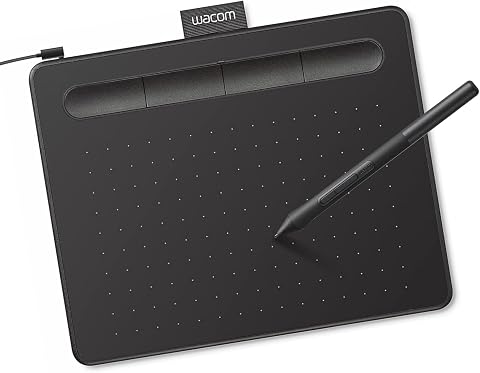 Wacom Intuos Small Wired Drawing Tablet with PenView on Amazon →
- 8
 HUION Inspiroy H640P 6 x 4 Inch Drawing TabletView on Amazon →
- 9
 TQU 8.5-Inch LCD Writing Tablets for Kids, 12-PackView on Amazon →
- 10
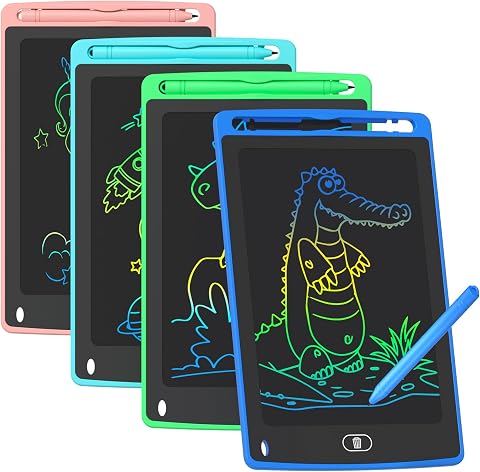 TQU 8.5-Inch LCD Writing Tablets for Kids, 4-PackView on Amazon →
Match the Tablet to the Workflow
The guide’s distinction among device types highlights how the choice changes an artist’s setup. A screen-free pen tablet can keep a desk setup relatively simple, but the artist draws on one surface while looking at a separate monitor. A pen display puts the image beneath the hand and adds a display to configure, as well as desk space and cable needs. The source presents a standalone device as reducing dependence on a computer, while noting that its operating system, apps and storage shape what it can do.
That distinction matters for buyers comparing prices or specifications across unlike products. The guide describes writing boards as intended for casual marks, not as equivalent to pressure-sensitive tablets used with illustration software. Checking the intended workflow, computer ports and application compatibility before buying can help avoid a device that does not fit the user’s actual setup.
Popular right now

Breville Barista Pro Espresso Machine with Built-In Grinder, Brushed Stainless Steel

Ninja Prestige Smart XL 10-in-1 Air Fryer and Countertop Oven with Pro Cook System, DT551

Dyson Airwrap i.d. 6-in-1 Multi-Styler and Dryer
As an affiliate, we earn on qualifying purchases.
Three Device Types, Different Setups
The ThorstenMeyerAI.com guide’s central distinction is between a pen tablet, a pen display and a standalone tablet. It describes pen tablets as having no built-in drawing screen and generally needing a connected computer. Pen displays let users work on the screen but, according to the guide, still rely on a computer. The guide presents a standalone product as an alternative for people who do not want that connection, though its available software and file handling remain relevant.
The guide also identifies size and controls as factors affecting fit. A small active area can be easier to carry or place on a crowded desk, while a larger one may give more room for hand movement and shortcut placement. It advises readers to consider the usable drawing surface rather than only a device’s outer dimensions. The guide describes pressure sensitivity, tilt, pen buttons and shortcut keys as workflow tools whose usefulness depends on the artist’s habits and software.
Specifications and Testing Details
The supplied ThorstenMeyerAI.com source gives recommendations and selection criteria but does not include prices, test dates, detailed measurements or a complete specification sheet for all 10 products. It also does not explain the individual testing methods behind the ranking, provide named reviewer quotations or state which operating systems and applications were checked for each model. Readers should treat the rankings as the guide’s judgments and verify current compatibility, included cables and product availability with the manufacturer or retailer.
The source names the Frunsi RubensTab T11 Pro as a standalone option, but does not detail its software limits or how it handles particular art applications and file formats. It likewise groups TQU products as LCD writing-board multipacks without establishing that they provide pressure-sensitive input or support desktop illustration software. Those distinctions should be checked against product documentation before purchase.
Check Compatibility Before Buying
Based on the guide’s comparison criteria, readers can start by identifying the software and setup they plan to use, then checking each candidate’s computer requirements, ports, driver support and active area. Buyers considering a pen display should also account for desk space and cable routing; those considering a standalone device should confirm that its apps and file workflow suit their projects.
The source does not announce a forthcoming product test or update. Prices, availability and specifications can change, so readers should confirm current details with manufacturers and sellers before making a purchase.
Key Questions
Which tablet does the guide recommend for most digital artists?
ThorstenMeyerAI.com names the Wacom Intuos Pro Medium, citing its larger work area, wireless connection and Pro Pen 3. That is the guide’s recommendation, not a guarantee that it will suit every artist or computer setup.
What is the difference between a pen tablet and a pen display?
The guide describes a pen tablet as having no built-in drawing screen, so the user draws on its surface while viewing a separate monitor. A pen display shows the artwork beneath the hand, but the guide says it still requires a connected computer.
Is the HUION Kamvas 13 (Gen 3) a standalone tablet?
No. The source presents it as a screen-based pen display for a more direct drawing experience and says pen displays still rely on a connected computer.
Are the TQU LCD writing boards suitable for digital art?
The guide describes the TQU four- and 12-pack LCD boards as options for shared notes or children’s doodling, not replacements for pressure-sensitive drawing tablets used in digital-art workflows.
What should buyers check before choosing a model?
The guide’s criteria point buyers to whether a device needs a computer, whether it supports the intended software, its active drawing area, portability, shortcut layout and connection requirements. For standalone devices, also check the available apps and file workflow.
Source: ThorstenMeyerAI.com